Building a Claude-powered Amazon agent takes a weekend for the first 80% — SP-API connection, tool definitions, PPC correlation. The last 20% takes 3–6 months: token refresh failures, Advertising API report polling, reimbursement cross-referencing, rate-limit state machines, multi-marketplace edge cases. Hard monthly cost once running: $200–$500. SellerForge has that plumbing already built, with plans from $49/month.
Claude is the right LLM for an Amazon AI agent. Its 200K-token standard context window (with a 1M-token beta tier) swallows entire search-term reports without chunking, its reasoning is sharp enough to actually catch the structural problems in a PPC account (not just the cosmetic ones), and its native tool-use makes wiring it into Amazon's Selling Partner API a clean engineering problem rather than a fragile prompt-chain.
If you're a developer or a technical seller weighing whether to build your own agent versus buying one, this guide is the honest map of the territory. The first 80% comes together in a weekend and feels magical. The last 20% — the part that turns a demo into something you can actually run a business on — takes months and routinely breaks the people who try.
You'll get the four-layer architecture I'd actually build, the specific APIs you'll need, the costs nobody publishes, the edge cases that take six months to discover, and an honest comparison against using something that's already built. By the end you'll know exactly what a production Claude-powered Amazon agent costs, what it can do, and whether you should write the code yourself.
What You're Actually Building
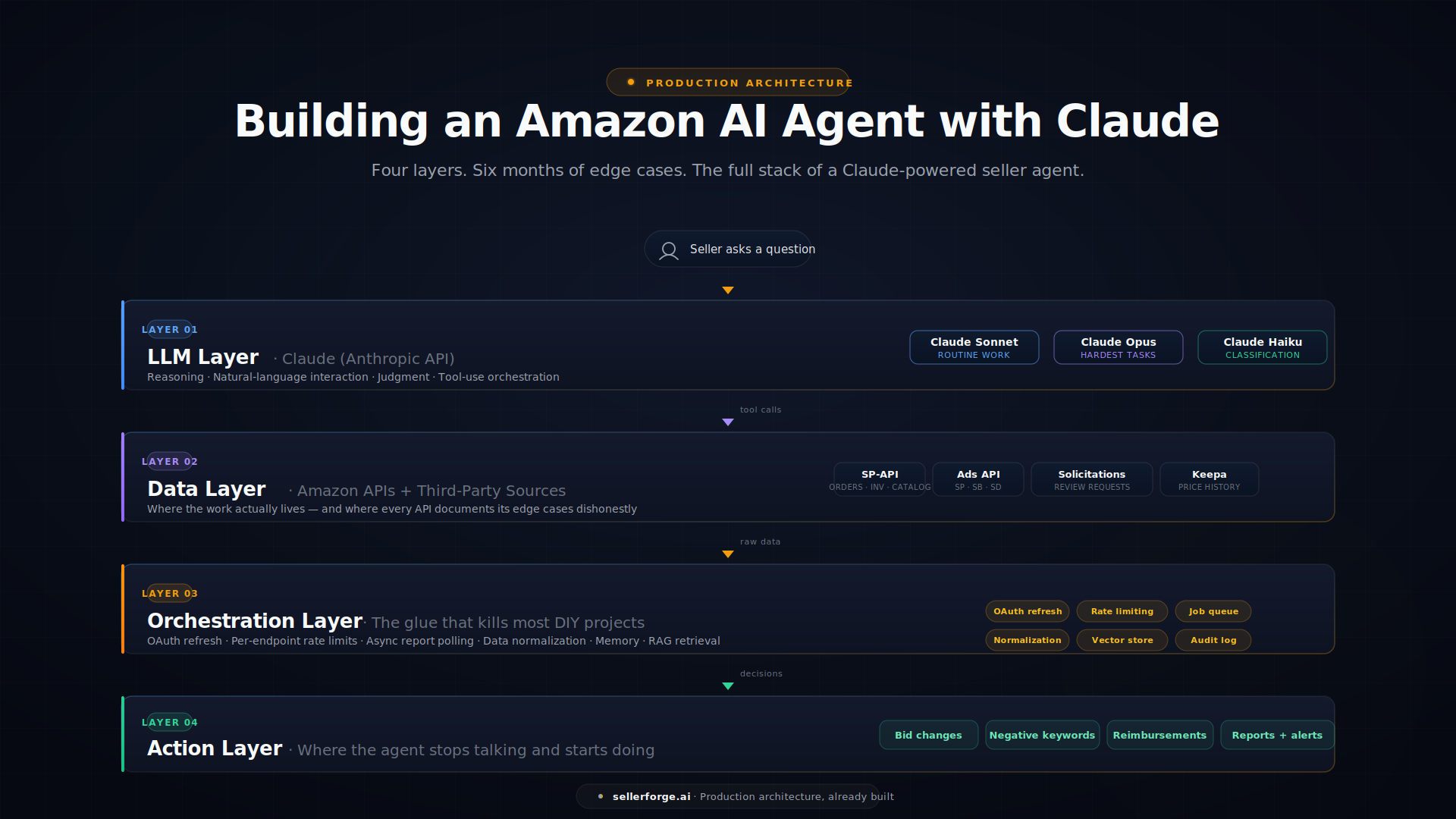
An "Amazon AI agent" sounds like one thing. In practice it's four layers stacked on top of each other, and each layer has its own failure modes.
Layer 1: The LLM Layer (Claude)
This is the brain. It handles reasoning, natural-language interaction, summarization, and judgment calls — "this campaign is structurally broken because three keywords are absorbing 70% of spend at 4% conversion." You'll use the Anthropic Messages API and lean heavily on tool use (also called function calling) so Claude can actually call your Amazon integrations rather than just talk about them.
Model selection matters more than most people realize:
- Claude Sonnet is the sweet spot for Amazon work. Strong reasoning on multi-step PPC analysis, fast enough for real-time chat, priced reasonably even on large search-term reports.
- Claude Opus is overkill for routine tasks but earns its cost on the hardest work: drafting a Plan of Action for a complex account suspension, or reasoning across an entire ASIN catalog plus uploaded supplier contracts and customs documents.
- Claude Haiku is cheap and fast but produces subtly wrong PPC recommendations often enough that you'll regret using it for anything important. Reserve it for cheap classification tasks — not for bid decisions.
Layer 2: The Data Layer (Amazon's APIs)
This is where the work lives. To build an agent that can actually run an Amazon business, you need:
- Amazon Selling Partner API (SP-API) for orders, inventory, catalog, financial events, performance notifications, account health, and the dozens of report types Amazon makes you poll for.
- Amazon Advertising API for Sponsored Products, Sponsored Brands, and Sponsored Display campaigns, plus the search-term reports and keyword data that any serious PPC agent needs.
- The Solicitations API if you want to send review requests programmatically — the only Amazon-ToS-compliant way to do this at scale.
- Third-party data sources depending on scope: Keepa for price history and BSR tracking, SmartScout or Jungle Scout for market intelligence, and currency/freight rate APIs if you're modeling international margins.
Every one of these returns data in a different shape, on a different cadence, with different authentication, and different rate limits. None of them documents their edge cases honestly.
Layer 3: The Orchestration Layer
This is the glue, and it's where most DIY projects quietly die. Something has to manage:
- Authentication. OAuth refresh tokens expire. Sometimes Amazon's auth server is slow and your refresh fails silently. SP-API uses Login with Amazon, the Ads API uses a separate OAuth flow, and the tokens for each have different lifetimes.
- Rate limiting. SP-API uses per-endpoint token-bucket limits, and your account's usage tier affects the burst capacity. The Ads API uses a different scheme. You'll hit 429 errors regularly and you need a back-off strategy that doesn't just crash.
- Report polling. Most SP-API data doesn't come from a single GET — it comes from a report request workflow: you ask for a report, wait for it to generate (anywhere from 30 seconds to 30 minutes), download the document, decompress it, and parse it. You need an async job queue, retry logic, and state management.
- Data normalization. The same ASIN can have different attributes in different endpoints. Dates come back in mixed formats. PPC reports nest campaigns inside ad groups inside keywords with different date-range semantics at each level.
- Memory. Claude doesn't remember between API calls. If you want a conversation that holds context across multiple turns, you're managing that state yourself.
- Retrieval (RAG). When the seller has uploaded supplier contracts, freight forwarder quotes, or product liability docs, you need a vector store (pgvector or Pinecone) and a retrieval layer so Claude can ground its answers in those documents.
Layer 4: The Action Layer
The point of an agent is that it doesn't just analyze — it does things. That means writing back to Amazon and the seller's stack: adjusting PPC bids, adding negative keywords, launching campaigns, generating PDFs and PPTX decks, sending Slack alerts, updating Google Sheets, drafting customer responses, building reimbursement claim packages.
Each action is its own integration. Each is one more thing that can fail. Each needs its own audit trail because "the AI changed my bids" is not a sentence anyone wants to hear without a log to back it up.
A clean mental model of the full stack:
User → Claude (Anthropic API)
         ↓ tool calls
       SP-API / Ads API / Keepa / Vector store
         ↓ structured results
       Claude (reasoning + synthesis)
         ↓ tool calls (action layer)
       Bid changes / negative keywords / reports / alerts
         ↓
       Audit log + response to user
That's the whole architecture. The first time you draw it, it looks tractable. It is — for 80% of it.
Getting Started: The First 80% Is Genuinely Easy
The encouraging part: a working prototype takes a weekend. Here's the path.
Step 1: SP-API Access
Register as an Amazon developer, create an app in Seller Central, and complete the developer profile. Generate your LWA (Login with Amazon) credentials, get your refresh token via the OAuth flow, and you can pull data. Plan about an hour to navigate the developer portal the first time — Amazon's docs are correct but unfriendly.
Step 2: A First Tool Definition
Write a function that pulls last-7-day sales data using the getOrders endpoint (or the Sales & Traffic report if you want item-level detail), format the result as clean JSON, and register it as a Claude tool. The tool definition looks like this:
{
  "name": "get_recent_sales",
  "description": "Pull sales data for the last N days from Amazon Seller Central.",
  "input_schema": {
    "type": "object",
    "properties": {
      "days": { "type": "integer", "minimum": 1, "maximum": 90 }
    },
    "required": ["days"]
  }
}
Step 3: Your First Real Question
Ask Claude: "What were my top five products by revenue last week, and is anything trending down?" Claude calls your tool, parses the JSON, identifies the trend, and gives you a real analysis. The first time this works, it feels like you've cracked the code.
Step 4: Add a Second Tool
Pull live PPC data using the Advertising API. Now Claude can correlate: "Your top revenue ASIN is at 28% ACoS, which is fine, but your second-top is at 51% — your ads are eating the margin on that one."
This is where most builders post the screenshot on LinkedIn and say "Why would anyone pay for an Amazon tool when I built this in a weekend?" The answer is in the next section.
Then You Hit the Last 20%
Week 2: The Token Refresh Problem
Your SP-API refresh token expires at 2 a.m. on a Tuesday. Your agent silently stops working. You don't notice until Wednesday morning when you ask for a report and get a stale answer. You add refresh logic. It works, mostly — except when Amazon's auth server returns a 5xx during the refresh window, your retry logic doesn't kick in fast enough, and the agent goes offline for six hours before your monitoring catches it. (You don't have monitoring yet. You'll build that in week 4.)
Week 3: The Advertising API Returns Nested Hell
You try to pull PPC data. Amazon's Advertising API returns campaigns with ad groups with keywords with search terms — four levels deep, each with different date-range behavior. Some endpoints return data inline; others require you to request a report, poll for completion, download a gzipped file, and parse it. Campaigns with quotes or special characters in the name break your JSON parsing. You spend a Saturday writing a state machine for report polling and a normalizer for campaign names with apostrophes in them.
Month 2: Reimbursements (The One Nobody Warns You About)
You decide your agent should automatically detect reimbursable units — lost FBA inventory, damaged warehouse stock, fee overcharges. This is one of the highest-value features for any Amazon seller and one of the hardest to build correctly.
Detecting a single reimbursement-eligible event requires cross-referencing at least six different report types: inventory adjustments, inbound shipment receipts, customer returns, FBA inventory ledger, fee preview reports, and reconciled financial events. The logic for "this unit was misplaced and not reimbursed within Amazon's 60-day window" requires matching an M (misplaced) event to its corresponding P (found) event, P event to a reimbursement record, and applying Amazon's evolving reimbursement policy windows (which changed materially in 2024 and again in early 2026).
Get the logic wrong and you flag false positives, the seller submits bogus claims, Amazon flags the account, and you've made things worse. Get it right and the seller recovers 1–3% of revenue they otherwise would have lost forever. There's no shortcut here — just hundreds of hours of edge-case work against Amazon's reporting reality.
Month 3: The Silent API Change
Amazon deprecates an Advertising API endpoint without warning. Your PPC reports stop flowing. You don't notice for three days because you don't have proper data-freshness monitoring — the agent kept "working," it just had stale data. By the time you fix it, your agent has been making bid recommendations against last-week's numbers. You add data-freshness checks to every integration. You wish you'd done it from day one.
Month 4: Rate Limiting Is Actually Hard
The SP-API rate-limit story is much more complex than the docs suggest. Different endpoints have different limits. Your "usage plan" tier (which Amazon assigns based on account history) caps burst capacity. The Reports endpoint has different throttling than the Catalog endpoint, which is different from the Orders endpoint. Without a per-endpoint token-bucket implementation and graceful exponential back-off, your agent crashes with 429 errors during high-volume periods — which, ironically, are exactly when you need it most.
Month 5: It Worked for Your Account
A friend asks if they can use it for theirs. Their account is in a different marketplace (UK instead of US), with different product categories, different PPC structures, more FBM orders than FBA, and a much larger catalog. Suddenly you're dealing with currency conversion, marketplace ID handling, category-specific keyword normalization, and edge cases your code never imagined. The "general-purpose Amazon agent" is an order of magnitude harder than the "my specific account" agent.
Month 6: Account Health and Compliance
You realize the agent should also monitor Account Health, parse performance notifications, and surface compliance issues before they become suspensions. You start building POA support. You discover Amazon's deactivation system has its own quirks: notifications arrive in unstructured prose, the appeal portal accepts different formats depending on the violation type, and the line between a warning and a full suspension is rarely clear. Drafting a POA that actually gets accepted requires domain knowledge that took years to acquire — and Claude can do it in 60 seconds only if you've structured the prompt with the right framing, the right examples, and the right document templates. Building that prompt library is its own multi-week project.
The Costs Nobody Publishes
Beyond engineering time, here's what running a serious Claude-powered Amazon agent actually costs:
Anthropic API. Sonnet usage for a single seller with a meaningful catalog and active PPC runs $80–$250/month, scaling with how much data you process. Large search-term reports and full ASIN catalog reviews are token-hungry. Use prompt caching aggressively or this number doubles.
Hosting. Your orchestration layer has to run somewhere with always-on uptime. A basic VPS is $20–$50/month. Add monitoring (Sentry, PostHog), background workers (Railway, Fly.io), and a managed Postgres with vector extensions, and you're at $80–$150/month for a single-tenant deployment.
Third-party APIs. Keepa starts at $19/month. SmartScout is $29/month. If you want competitor tracking, market intelligence, or BSR history, you're stacking subscriptions. $50–$100/month minimum for a full-featured agent.
Storage and compute spikes. Vector storage scales with your document corpus. Document generation (PPTX, XLSX, PDF) is server-side and CPU-heavy. Expect $20–$60/month here.
Your time. Conservatively, 5–10 hours per month maintaining a production agent: API changes, edge cases, refresh-token issues, new report formats. At any honest hourly rate, that's $500–$2,000/month of your labor — and that's after the initial 3–6 months of build time.
Hard total: $200–$500/month in recurring costs, plus 5–10 hours/month of maintenance. For something that handles roughly 60–70% of what a production Amazon platform does, against a single account.
SellerForge: Everything Above, Already Built
Everything described in this guide — the SP-API integration with proper auth refresh, the Ads API connection with report polling and rate-limiting, the Keepa data layer, the reimbursement detection logic, the listing audit scoring, the Plan of Action generator, the deliverable builder for investor decks, the document vault with RAG retrieval, the multi-marketplace handling, the silent-failure monitoring, the audit logs, the conversation memory — that's what SellerForge is.
SellerForge is the Claude-powered Amazon agent you'd build if you had eighteen months, a dedicated engineering team, deep Amazon domain expertise, and the patience to chase every edge case. It connects directly to Seller Central via SP-API, ingests the Advertising API, parses uploaded supplier contracts into a vector store, and presents the entire thing through a conversational AI assistant that lives on every page of the app. See the full module list →
Status, checked September 25, 2026: some of those modules are held back while SellerForge verifies the underlying data. Amazon Ads performance ratios, waste review, and bid or budget changes are paused while Amazon Ads data is verified; the Profit & Loss view and deliverable generation are temporarily withheld; and reimbursement detection flags potential discrepancies for your review (estimated, not confirmed as owed) rather than preparing claims.
An illustrative example of one conversation (the account and figures are made up):
You: Give me a full business briefing — sales, PPC, inventory, suspensions, anything I should know.
SellerForge: Pulling from your Seller Central account, Advertising API, and uploaded documents…
📊 Sales (last 7 days): $42,180 in revenue (+11% WoW). 1,247 units. Top performer: B09KX7 at $6,840 (+18% WoW). Biggest decline: B0BFR4 at $2,150 (−22% — competitor issue, see below).
💰 PPC: 14 active Sponsored Products campaigns and $5,210 in spend over the last 7 days. Performance ratios and waste review are paused while Amazon Ads data is verified, so I won't score campaigns or suggest cuts yet; I can walk you through the campaign structure and recent changes instead.
📦 Inventory: Two SKUs below 7-day supply. B09KX7 has 19 units left at 3.2/day velocity — stocks out in 6 days. B08MN2 has 11 units, 2.4/day, 5 days. Six more SKUs approach reorder point within 14 days.
⚔️ Competitors: New seller on B0BFR4 at $22.99 (you're at $27.49), winning Buy Box 38% of the time since appearing four days ago. This explains the revenue drop.
💵 Reimbursements: Four potential discrepancies to review this week, an estimated $312 (estimated, not confirmed as owed). Check each against your own records before you open a case with Seller Support; you keep 100% of anything you recover.
🩺 Account Health: No new performance notifications. ODR holding at 0.4%, LSR 1.8%, all green.
Priority actions:
1. Reorder B09KX7 and B08MN2 immediately
2. Decide on B0BFR4 competitor response (three options below)
3. Review four potential reimbursement discrepancies (about $312, estimated)
Want me to lay out the B0BFR4 pricing options, or start with the reorder quantities?
That conversation touches seven different API integrations, four kinds of analysis, and three decisions queued for you. Building it from scratch with Claude would take six to twelve months. In SellerForge, it's a sixty-second prompt — and the AI Assistant lives on every page, so you can ask in context whether you're inside the Listing Audit, the Advertising module, or the POA Builder.
The thing the demos never show: every recommendation is traceable to the underlying data. When SellerForge says "B0BFR4 lost revenue because of a new competitor," you can click through to the Keepa price history, the Buy Box win-rate data, and the timestamp of when the competitor appeared. Build that traceability layer yourself and you've added another month of work.
Build vs. Buy: The Honest Math
| Dimension | Build Your Own | SellerForge |
|---|---|---|
| Initial dev time | 3–6 months | 5 minutes (sign up + connect SP-API) |
| Monthly hard costs | $200–$500 | $49–$99 (Core or Growth) |
| Monthly maintenance | 5–10 hours | Zero |
| Coverage | 60–70% of what you need | Listing audits, POAs, campaign structure, reimbursement discrepancy detection, forecasting, document vault, AI assistant on every page (Ads performance review and deliverable generation are paused today) |
| Multi-marketplace | Months of additional work | Included |
| Reimbursement detection | Hardest module to build correctly | Included: potential-discrepancy detection for your review (claim preparation is off) |
| Deliverable generation (PPTX/XLSX/PDF) | Separate document-generation pipeline | Temporarily withheld while evidence and file binding is completed |
| Account health monitoring | Manual integration | Continuous, with proactive alerts |
| Vector store + uploaded docs | DIY pgvector or Pinecone setup | Included, parses contracts and freight quotes natively |
| Updates when Amazon changes APIs | You fix it | We fix it before you notice |
| Audit log for AI-initiated actions | DIY | Included for every recommendation and action |
At the prices Anthropic charges for API tokens, SellerForge Growth at $99/month costs roughly what you'd spend on the Claude API alone for a single account at moderate usage — before any of the infrastructure, third-party APIs, or your own engineering hours. SellerForge is priced to make the build-versus-buy math obvious.
When Building Your Own Still Makes Sense
Despite all of the above, building your own Claude-powered Amazon agent is a legitimate choice in three scenarios:
You're a developer who genuinely enjoys the process. This is a meaty engineering project that touches OAuth flows, distributed systems, queueing, retrieval-augmented generation, document parsing, and LLM tool design. If that sounds fun, the build itself is the reward.
You have requirements so specific that no existing tool covers them. Niche category, unusual fulfillment model, custom internal workflows, or integrations with proprietary systems that an off-the-shelf platform won't touch.
You're learning. Building an Amazon AI agent is one of the better self-directed projects for learning modern LLM application development. You'll touch every layer of the stack.
If you're going to build anyway, here's what I'd tell you:
- Start with Claude Sonnet, not Haiku. The quality difference on Amazon data analysis is meaningful and worth the cost.
- Build rate limiting from day one. Per-endpoint token buckets, exponential back-off, and the assumption that Amazon will throttle you when it matters most.
- Use prompt caching aggressively. Anthropic's prompt caching can cut your Claude API spend by 40–60% on repeated workflows. Set up cache breakpoints at the system prompt level immediately.
- Use a message queue. Don't try to call Amazon's APIs synchronously from your web app. A proper job queue with idempotent handlers is essential for anything beyond a prototype.
- Build data-freshness monitoring. The worst failures are the silent ones — the agent that keeps "working" but with stale data. Every integration should report when it last successfully ingested, and you should alert on staleness, not just errors.
- Monitor your Anthropic API spend weekly. It's easy to introduce a regression that doubles your token usage.
- Build the reimbursement module last. It's the highest-value feature and the easiest one to get wrong. Wait until you have rock-solid data infrastructure before attempting it.
The first 80% is a great weekend project that will teach you a lot. Just know what the last 20% costs before you commit a year of your life to it. And if you'd rather skip to the end state, SellerForge starts at $49/month and the free trial connects to your real Seller Central account in under five minutes. Prefer to drive it from the AI you already use? SellerForge also exposes a guarded MCP connector (read-only today) for Claude, ChatGPT, Cursor, and Claude Code.
2026 update: whichever side of build-vs-buy you land on, the connection layer itself is now standardized. Our guide to connecting Seller Central to Claude and ChatGPT over MCP covers what Amazon officially supports, the four connection routes, and the Read→Propose→Apply safety ladder to apply before any AI touches a live account.
Related reading: Amazon Prime Day 2026 Listing Prep: The 6-Week Playbook — how to optimize your listings for Alexa for Shopping before peak traffic. And if you're modeling your Amazon cash flow, see Amazon DD+7 Payout Policy: Managing Cash Flow and Working Capital in 2026.
David Gallo is the founder of SellerForge.ai. He previously managed 57 Amazon accounts and over $350M in sales at Worldfront before building SellerForge to give sellers AI-powered tools at agency-quality without the agency price.