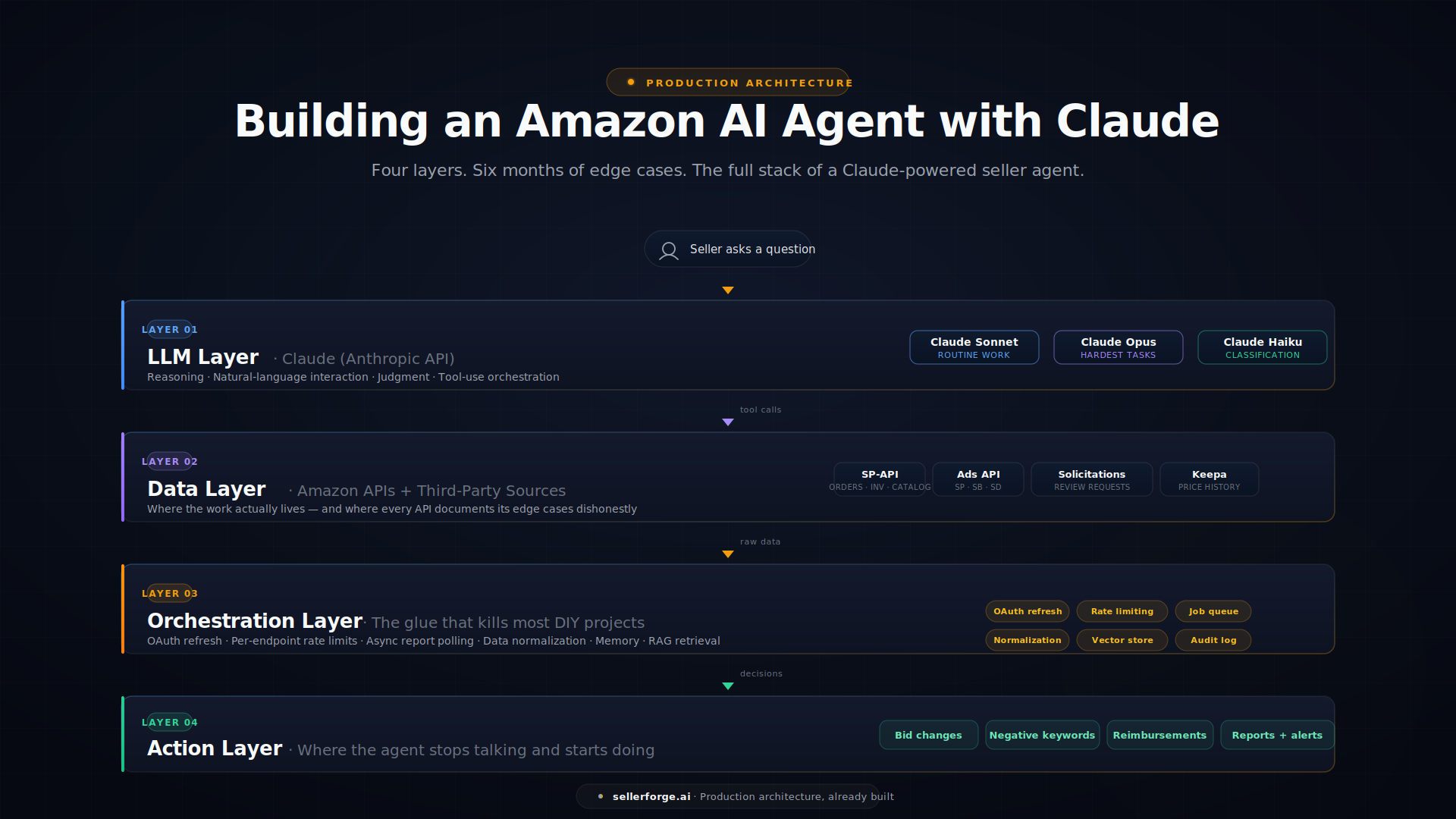
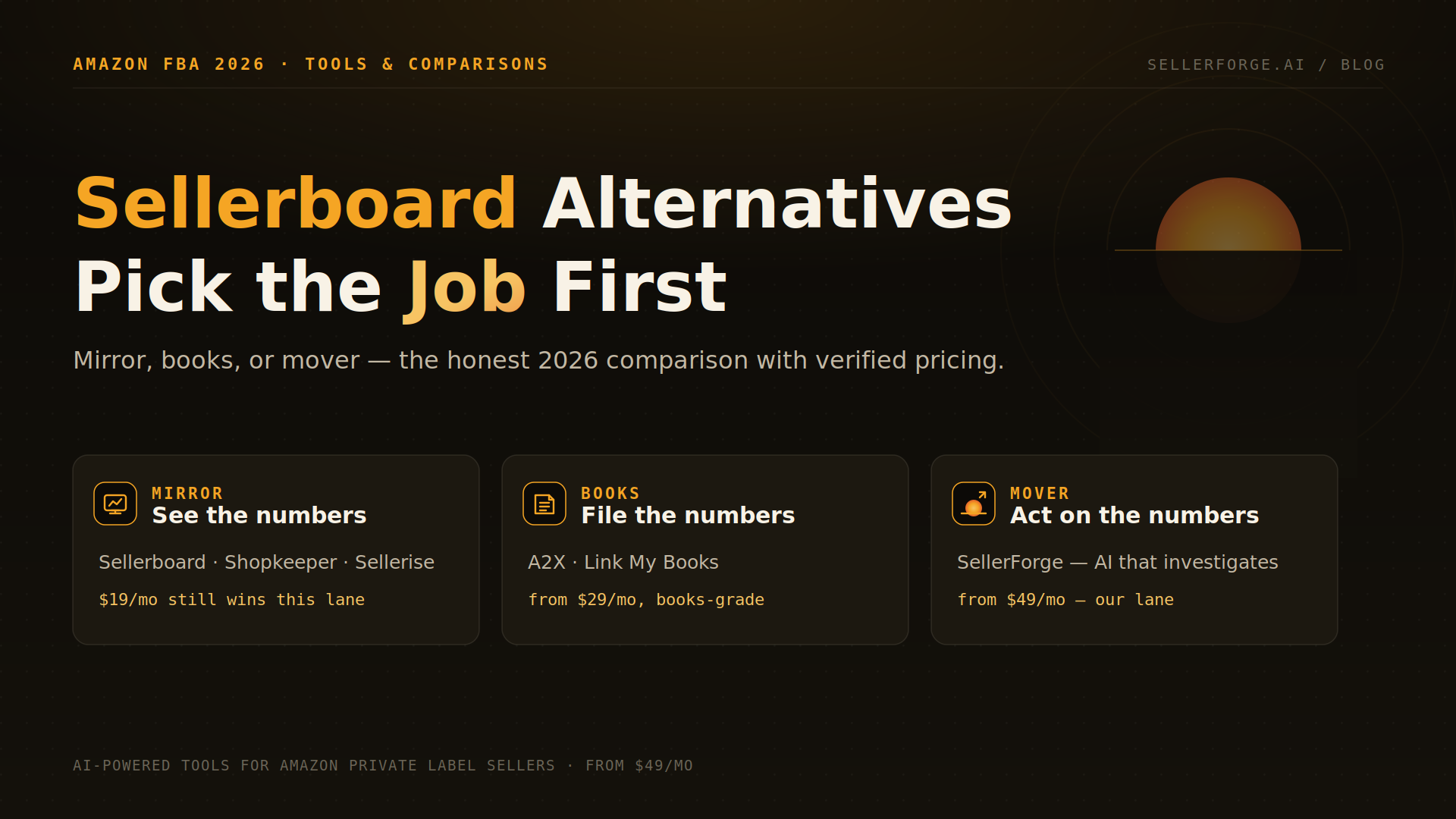
Claude Cowork is a strong starting point for AI-driven Amazon work: cloud scheduled tasks, local Dispatch work, and Live Artifacts cover many one-off and recurring jobs once you add an Amazon data connector. The tradeoff is ownership. You still choose and maintain the connector, permissions, account context, rate-limit budget, and API edge cases. Best mental model: Cowork is the engine; SellerForge is the Amazon operations layer around it.
Claude Cowork is the right place to start if you're an Amazon seller who wants AI to do real operational work — not just answer questions, but actually move files, read your Seller Central reports, draft your Plans of Action, build your weekly business briefing, and run on a schedule while you sleep.
It is also, for any seller serious about Amazon-specific work, a starting point and not a destination.
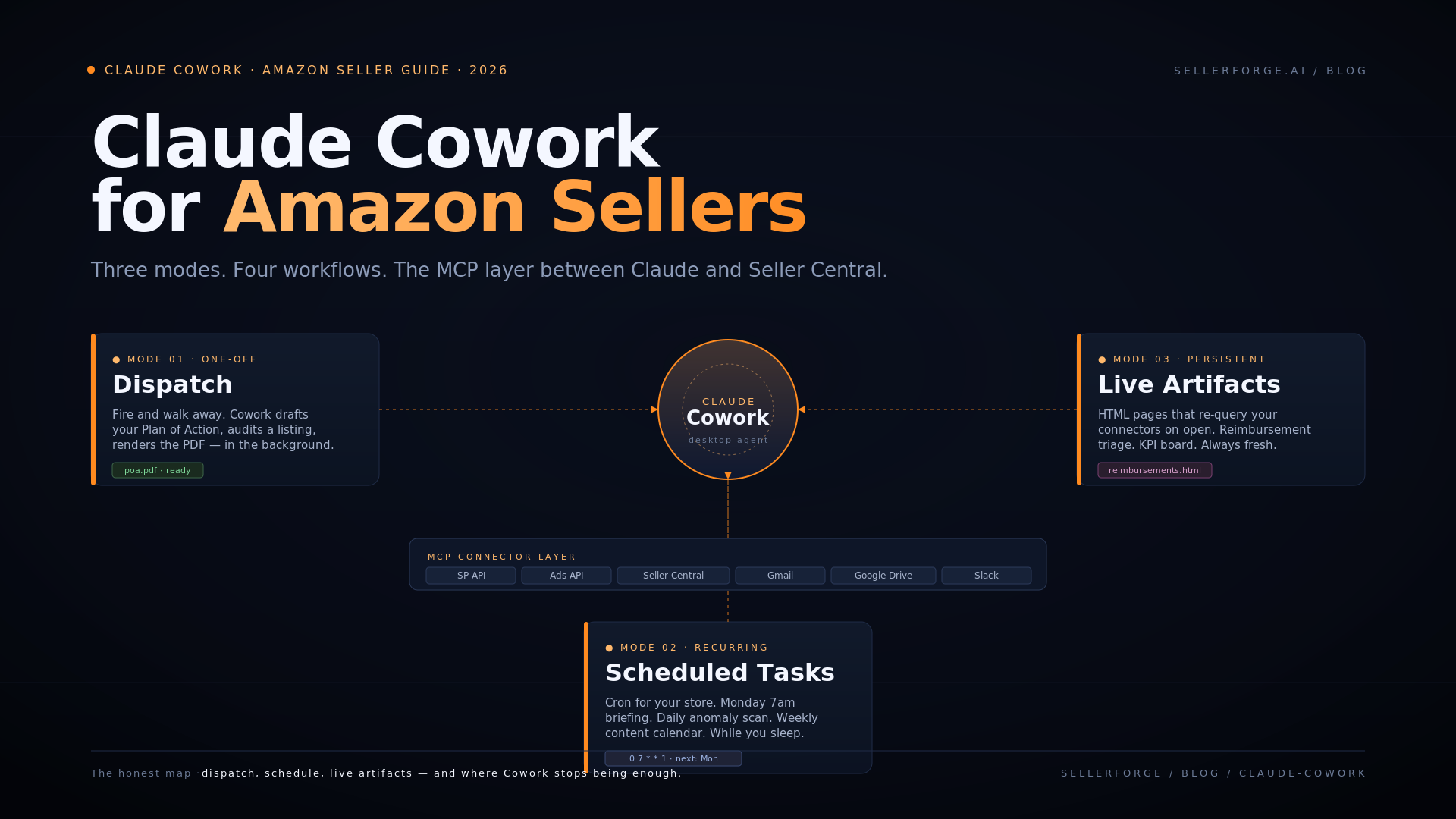
This guide is the honest map. You'll get the three operating modes Cowork gives you (Dispatch, Scheduled Tasks, and Live Artifacts), the plugins and skills worth installing for Amazon work, the MCP servers that connect Cowork to Seller Central, the four workflows that hold up best in practice, and a clear-eyed look at where general-purpose Cowork stops being enough — and where a purpose-built Amazon platform takes over.
If you've spent any time experimenting with Cowork, you already know the first 80% feels like magic. This article is about both halves of the curve.
What Claude Cowork Actually Is
Verified August 19, 2026: Claude Cowork is Anthropic's agentic workspace for multi-step knowledge work. Cowork sessions run remotely by default and can continue after you close your laptop; when a task needs local files, your browser, or desktop apps, the Claude Desktop app must remain open so the cloud session can reach that machine. Anthropic documents the current execution model in its Cowork getting-started guide.
The thing to internalize is that Cowork is not just a chatbot. It can work with files, execute code in an isolated environment, connect to external services, use reusable skills and plugins, and run tasks on a schedule. For an Amazon seller, that combination is closer to a configurable operations analyst than a blank chat window.
There are three modes you'll use.
Dispatch is the one-off mode. "Read this Amazon Plan of Action rejection, identify every reason Amazon listed, and draft a revised response that addresses each one with evidence from my files." Verified August 19, 2026: a cloud session can keep working when your computer is off, but Dispatch work that reaches local files or desktop apps still needs the desktop machine awake and Claude Desktop open.
Scheduled Tasks are the recurring mode. "Every Monday morning at 7 a.m., pull last week's connected business data and produce a one-page summary with anomalies highlighted." Verified August 19, 2026: scheduled tasks run remotely on their cadence even when your computer is asleep or Claude Desktop is closed. The exception is local access: a task tied to files or apps on your computer runs locally and needs that machine available. See Anthropic's scheduled-task documentation.
Live Artifacts are persistent interactive HTML pages that can refresh from approved connectors and local files when opened. Verified August 19, 2026: they are desktop-only, keep version history, and use the viewer's own access when shared inside a Team or Enterprise organization. Anthropic's Live Artifacts guide is the current source of truth.
Layered on top of those three modes are four building blocks: skills, plugins, MCP connectors, and projects.
Skills are reusable instruction packages that teach Claude how to complete a particular kind of work. You can install them from Claude's Customize directory or upload your own. Verified August 19, 2026: installed skills are available in chat and Cowork, and can be enabled or disabled individually.
Plugins bundle skills, connectors, and sub-agents around a job. Verified August 19, 2026: plugins are available on paid plans; plugin skills work in chat and Cowork, while hooks and sub-agents run in Cowork. Anthropic documents the current boundary in Use plugins in Claude.
MCP connectors are how Cowork talks to external systems. Remote connectors work across Claude surfaces; local MCP servers and desktop extensions depend on the desktop app. Directory re-checked September 25, 2026: Anthropic's connector directory now lists Amazon's own Selling Partner connector, in beta and added in September 2026. On August 19 it listed no first-party Amazon or Seller Central connector, so until then Amazon access came only from a custom or third-party MCP server.
Projects group tasks around shared files, context, instructions, and memory. Verified August 19, 2026: Cowork projects are available on desktop, are stored locally, and do not currently sync project data between devices. For a seller, one project per brand or account keeps context boundaries clear. See Anthropic's Cowork projects guide.
That's the toolbox. Now let's talk about what you actually build with it.
What to Build First: Four Amazon Workflows That Hold Up
The mistake most new Cowork users make is starting with the most ambitious workflow they can imagine. Build something useful and small first. Here are the four I'd recommend, in order.
1. The "Plan of Action" Dispatch
Amazon's account suspension and listing suppression process is a paperwork problem disguised as a compliance problem. A POA that gets reinstated has four sections — root cause, immediate corrective actions, long-term preventive actions, and supporting evidence — and Seller Performance rejects appeals that miss any one of them.
Cowork handles this well as a Dispatch:
- 1Drop your Account Health notification and any related case correspondence into a folder Cowork can read.
- 2Add the relevant Performance Notifications and metric history (Order Defect Rate, Late Shipment Rate, etc.) as supplementary files.
- 3Prompt: "Read everything in this folder. Identify the specific Amazon policy cited. Draft a Plan of Action with the four required sections. Pull supporting evidence from my files. Format the output as a clean PDF I can submit."
Cowork triggers the pdf skill, drafts the document, and gives you a submission-ready file in a few minutes. Compared to writing one from scratch — typically four hours when you're new to the process — this is the single highest-leverage Amazon use of Cowork. (If you'd rather skip the prompt engineering, the SellerForge POA Builder ships pre-trained on Seller Performance's current accepted format and updates each time Amazon shifts the rules.)
The honest caveat: the quality of the POA depends entirely on the quality of context you give it. Amazon's policy interpretations shift quarterly, the formats Seller Performance accepts vary by violation type, and the line between a warning and a full suspension is often unclear. A POA drafted by Cowork against a well-curated context folder is good. A POA drafted by Cowork against a vague prompt is generic and gets rejected. Treat this as a serious context-engineering task, not a chatbot question.
2. The Weekly Business Briefing (Scheduled Task)
Most operators spend their Monday morning hunting through five different Seller Central reports to figure out what happened the prior week. This is what scheduled tasks were built for.
The recipe:
- 1Connect an Amazon Seller Central MCP server (more on this below) so Cowork can read your business reports.
- 2Connect Gmail (or Outlook) so Cowork can email the output.
- 3Schedule a task to fire every Monday at 7 a.m. that pulls last week's revenue, units, top movers, top decliners, account health status, and PPC spend; runs Claude's reasoning across the data to surface anomalies; and emails you a one-page briefing.
This is the kind of work that earns Cowork's keep. The first version takes an afternoon to wire up. After that, it runs on autopilot.
Two practical constraints remain. Cloud-connected data can be processed remotely, but local spreadsheets, browser sessions, and desktop apps still require the linked computer to be available. And scheduled work draws from the same Claude usage allocation as your other Claude surfaces; large recurring jobs consume more than lightweight chat, so scope the date range and output deliberately.
Worked example from our own scheduled workflow: the real input was, 'Read the latest 28-day Search Console snapshot, compare it with the prior window, and recommend exactly one evidence-led SEO action.' The one-page output flagged that this guide's impressions had risen 86% while average position slipped from 7.2 to 8.0, and that connection-intent queries were stranded at positions 17–27. It also caught the obsolete laptop-awake claim you just read corrected above. That finding — not a generic content calendar — triggered this refresh.
3. The Listing Audit Dispatch
Most Amazon listings are written once and never revisited. Cowork makes a good auditor:
- 1Paste your ASIN into the prompt or upload your live listing as HTML/screenshots.
- 2Prompt: "Audit this listing against Amazon's 2026 title and bullet best practices. Check character limits, keyword indexing rules, bullet hierarchy, and backend search term overlap. Flag specific weaknesses with revised copy options."
Cowork triggers the docx skill, returns a structured audit document with line-by-line suggestions, and you have a concrete edit list to take into Seller Central. It's not as deep as a purpose-built listing tool, but for sellers without one, this is meaningfully better than the existing listing. (See the SellerForge Listing Builder + Audit for the category-aware version.)
The limitation: Cowork doesn't know your category's actual top-ranking competitors or current keyword landscape unless you provide that data. It will give you a clean audit against general best practices. It will not give you the category-aware audit that compares your listing to the top three competitors actively indexing for your priority keywords. That's a different problem and a different tool.
4. The Reimbursement Triage Live Artifact
Reimbursement review can surface lost FBA units, damaged returns, fee overcharges, and customer refunds without corresponding product returns. Eligibility windows and evidence requirements vary by case type, so the useful output is a dated triage queue with source records — not an unsupported estimate of how much every seller is missing.
A Live Artifact in Cowork can help by acting as a recurring triage queue:
- 1Connect an Amazon Seller Central MCP server with access to FBA inventory ledger, inbound shipment data, and reconciled financial events.
- 2Build a Live Artifact that re-scans those reports each time you open it and surfaces a list of potentially reimbursable cases with case-type tags, date stamps, and dollar values.
- 3From the artifact, fire a Dispatch on each case to draft the claim copy for submission.
The catch is that reimbursement detection requires matching events across multiple reports and applying the current eligibility rule for each case type. A connector that exposes only a basic inventory or payments view cannot prove every case. Verify the applicable Amazon policy when the workflow runs, retain the source records, and treat the artifact as triage rather than an automatic claim decision. SellerForge's Reimbursement Claims module is the maintained alternative for the detection step: it flags potential discrepancies for your review (estimated, not confirmed as owed), and claim preparation is off today.
Connecting Cowork to Amazon: The MCP Server Question
Connection paths verified August 19, 2026, and re-checked September 25, 2026. Anthropic's connector directory now lists Amazon's Selling Partner connector, in beta for sellers in Amazon's U.S. stores; it brings Seller Assistant's view of your sales, inventory, and listings into Claude and asks you to approve each action. The other working paths are a remote Amazon-data MCP service, a self-hosted SP-API-to-MCP bridge, or a product such as SellerForge that already connects to Amazon and exposes a separate guarded MCP endpoint. Browser use can help with an occasional UI task, but it is not an API substitute for recurring data pipelines.
Connecting Amazon Seller Central to Claude (Cowork and Claude Code)
The shortest managed path is to connect Seller Central to an Amazon-data product, then add that product's remote MCP endpoint to Claude. With SellerForge, you add https://www.sellerforge.ai/api/mcp as a custom connector and authorize your SellerForge account. SellerForge already holds the seller-approved Amazon connection; the MCP token is OAuth 2.1 or a scoped static key, and the exposed tools cover sales, orders, inventory, account health, reimbursements, keywords, and Sponsored Ads campaign data. The connector is read-only today; guarded proposals return on paid plans as SellerForge enables them, and they stage for your approval instead of going to Amazon directly. The current setup steps and tool boundary are on the SellerForge MCP page.
To connect Amazon Seller Central to Claude Code without a managed layer, self-host an SP-API bridge such as MarceauSolutions/amazon-seller-mcp or jay-trivedi/amazon_sp_mcp, then add that local or remote server to Claude. Both repositories document LWA credentials and a seller refresh token; their published surfaces focus on orders, inventory, catalog/listings, reports, returns, and related seller data. Advertising is absent or listed as planned, and neither repository documents Vendor Central or DSP coverage.
The DIY stop-line: Amazon's official flow uses Login with Amazon authorization codes, one-hour access tokens, long-lived refresh tokens, region-specific endpoints, role-scoped operations, and annual reauthorization for public apps. You own secure token storage, refresh and reauthorization, pagination, retries, rate limits, marketplace routing, and per-account isolation. Read Amazon's authorization guide and reauthorization guide before treating a proof of concept as production infrastructure.
Connecting Amazon Vendor Central to Claude
Vendor Central is not a toggle on a seller connector. Amazon lets an SP-API application register for Sellers, Vendors, or both, and the vendor APIs use their own roles and operation families. For example, the Vendor Orders API covers purchase orders and acknowledgements, while Direct Fulfillment adds separate inventory, shipping, transaction, and payment APIs. A public app still uses Amazon's LWA authorization flow, but the vendor grants and available operations must be approved explicitly.
To connect Amazon Vendor Central to Claude or Claude Code through a managed service, DataDoe's current MCP documentation claims Seller Central, Vendor Central, and Amazon Ads data through a remote HTTP MCP server authenticated with a DataDoe MCP key. Verify the exact Vendor tables and refresh cadence you need before buying. The two open-source seller bridges above do not document vendor endpoints, and SellerForge's public MCP connector is Seller Central-focused today.
The DIY stop-line: vendor operations are role-specific, some Direct Fulfillment operations require restricted roles and Restricted Data Tokens, and a complete workflow spans more than purchase-order reads. If your job needs acknowledgements, labels, shipment confirmations, invoices, or multiple vendor groups, treat each as a separately tested tool with an explicit write policy.
Connecting Amazon DSP to Claude
Amazon DSP is reached through the Amazon Ads API, not Seller Central's SP-API. Amazon says the Ads API requires an application and approval process, and the caller must have access to the relevant advertiser or partner accounts. The current DSP campaign and creative APIs can read and manage campaigns, ad groups, targets, creatives, audiences, and deals, but access to one Amazon surface does not grant the others. Start with Amazon's Ads API access guide and its DSP campaign and creative API announcement.
To connect Amazon DSP to Claude Code or Cowork, put an MCP tool layer in front of your approved Ads API application and expose only the advertiser accounts and read/write operations the workflow needs. DataDoe documents Amazon Ads coverage but does not explicitly promise DSP in the MCP overview, so mark DSP as unverified until the provider confirms the exact endpoints. SellerForge's current public MCP tools cover Sponsored Ads campaign data, not DSP.
The DIY stop-line: API approval, advertiser-account mapping, asynchronous reports, rate limits, and campaign writes are all separate failure points. Begin read-only. If you later expose budget, bid, target, or creative writes, stage them behind a human approval queue and keep an immutable change log.
This matrix is a sanitized point-in-time view of the connector surfaces checked on August 19, 2026; the Amazon Selling Partner and SellerForge rows were re-checked on September 25, 2026. “Not documented” means the provider or repository did not claim that surface in the cited public source; it is not a permanent verdict.
| Connector | Seller Central | Vendor Central | Amazon Ads / DSP | Auth and refresh boundary |
|---|---|---|---|---|
| Amazon Selling Partner (by Amazon, beta) | Sales, inventory, and listing performance; actions such as price changes after you approve each one (U.S. stores) | Not documented | Not documented | Remote MCP made by Amazon; you connect your Seller Central account in Claude |
| SellerForge MCP | Sales, orders, inventory, health, reimbursements, keywords | Not exposed | Sponsored Ads campaign reads; DSP not exposed | Amazon OAuth managed by SellerForge; MCP uses OAuth 2.1 or scoped key |
| DataDoe MCP | Documented | Documented | Amazon Ads documented; DSP endpoints not explicit | Amazon accounts connect to DataDoe; remote MCP uses a DataDoe MCP key |
| MarceauSolutions amazon-seller-mcp | Orders, inventory, product data, fees and restock tools | Not documented | Not documented | Self-hosted; operator supplies LWA/AWS credentials and seller refresh token |
| jay-trivedi amazon_sp_mcp | Sales, returns, inventory, listings and reports | Not documented | Advertising listed as planned; DSP not documented | Self-hosted; operator supplies LWA credentials and seller refresh token |
The pragmatic choice is surface-by-surface: use a managed remote connector when it documents the data you need; self-host only when you can own Amazon authorization and maintenance; and keep browser work for supervised one-offs. For any write path, the safe minimum is scoped credentials, explicit approval, a change log, and a way to revoke access immediately.
The Skills and Plugins Worth Installing
Directory checked August 19, 2026: Claude offers broad knowledge-work skills and plugins, but the Amazon-specific data layer comes from a connector — custom or third-party then, and since September 2026 also Amazon's own Selling Partner connector (in beta, re-checked September 25, 2026). For a seller, start with the output and source connectors your workflow actually needs:
Document and spreadsheet skills: Use the current Word, spreadsheet, presentation, and PDF skills for POAs, audits, supplier briefs, reimbursement queues, and reporting. Confirm the installed skill names in Claude's Customize directory because the catalog can change.
Gmail and Google Drive connectors: For email-driven workflows (sending the Monday briefing, processing supplier emails, archiving Amazon performance notifications) and for using Drive as a context library Cowork can reference.
Google Calendar: For workflows that depend on time (Prime Day prep timing, supplier lead-time calculations, promo windows).
An Amazon Seller Central MCP server from the verified paths above. SellerForge's guarded MCP connector exposes seller-scoped read tools and is read-only today; its setup page is the source of truth for current plan access and tool availability.
A web search or research connector: For competitor monitoring and category research workflows. The native research tooling in Cowork is decent; a specialized connector (Tavily, Exa, or similar) handles structured retrieval better.
Custom skills you write yourself: This is where Cowork gets interesting. Open the skills folder and write a markdown file called amazon-poa.md that contains your specific instructions for how a Plan of Action should be structured for your category and your account's recent issues. Now every time you prompt Cowork about a POA, it pulls in those instructions automatically. Same pattern for your listing voice, your supplier brief format, your reimbursement claim templates, your weekly briefing format. Writing five or six of these custom skills is the difference between a generic Cowork setup and one that actually understands how you run your Amazon business.
The practical test is repetition: when you have reviewed and reused the same instruction twice, turn it into a skill and give it a source-review date.
If you want a reviewed starting point instead of a blank file, SellerForge's AI Skills and Prompts library includes eight Amazon-seller workflows with full prompts, fictional examples, versioned downloads, and explicit connector requirements.
Where Cowork Stops Being Enough
After three months of running real Amazon workflows through Cowork, you'll notice the same set of friction points. They're not Cowork's fault — it's a general-purpose agent platform doing general-purpose things well. But they matter if you're trying to run an Amazon business on it.
Context is yours to manage. Cowork does not ship with your account history, evidence, Amazon role permissions, or a maintained interpretation of every current policy. Load those sources into the project or connector and date-stamp policy instructions. When Amazon changes a rule, any custom skill that cites the old rule is stale until you update it.
No native Amazon data model. Cowork sees the tools and records a connector exposes; it does not automatically know which joins matter to your business. An organic-rank keyword overlapping a high-spend PPC search term can be a cannibalization signal, but only if the workflow asks for both datasets and applies the right rule. Purpose-built tools can encode that question by default. (See Beyond ACoS: The Advertising Metrics That Actually Matter in 2026 for the framework.)
Local dependencies still need your machine. Verified August 19, 2026: cloud scheduled tasks run with your computer off, but a run that needs a local folder, browser, local connector, or desktop app cannot reach that resource while Claude Desktop is closed. Design recurring briefings around remote connectors or account-saved files if unattended execution matters.
Usage limits still need a budget. Verified August 19, 2026: Claude plans use a rolling five-hour session window plus weekly limits, and usage varies with model, task complexity, and context size. Paid-plan users can enable usage credits to continue at standard API rates after included limits. Anthropic's pricing page and usage-credit guide are the current sources; this article deliberately makes no fixed-message or guaranteed-cap claim.
No persistent Amazon-specific intelligence. Cowork doesn't track your category's competitor pricing history, your ASINs' Buy Box win rate over time, your search-term harvest opportunities, or your account-level performance trends. Each session starts fresh against whatever data you load into it. You can fake persistence with Projects and a brain folder, but you're building the intelligence layer yourself, one skill at a time.
API maintenance is still yours. SP-API and Amazon Ads endpoints, schemas, roles, and authorization rules change. A connector needs version monitoring, retry and rate-limit handling, regional routing, and data-freshness checks so a scheduled task fails visibly instead of returning a polished answer from stale data.
None of this means Cowork is the wrong tool. It means Cowork is the right tool for general work and a partial tool for Amazon work. Knowing the difference saves you months.
SellerForge: Cowork's Amazon Layer, Done
SellerForge supplies the layer Cowork leaves for you to assemble: the SP-API authorization and refresh path, Amazon Ads report polling, seller-scoped data model, reimbursement and forecasting workflows, account context, and hosted monitoring. The feature list shows the current product surface.
SellerForge uses Anthropic models where they fit, but model names and routing can change. The durable difference is the stack above the model: Amazon-specific data, permissions, workflows, safeguards, and maintenance.
The specific differences that matter for an Amazon seller:
Less setup per analysis. SellerForge already has the Amazon data model, account connection, and audit workflow. A comparable Cowork analysis first needs a connector, the right permissions, category context, and your own reusable instructions. The advantage is repeatability, not a universal seconds-per-audit promise.
Maintained Amazon context. Amazon's policies, fee structures, roles, and report formats change. SellerForge maintains the shared prompts, scoring rules, and data pipelines centrally; a DIY Cowork setup leaves that maintenance schedule with you.
Business-data context connected once. SellerForge brings authorized Seller Central data into a seller-scoped account model so its tools can reuse sales, inventory, advertising, account-health, reimbursement, and return context. In a DIY Cowork setup, you decide which of those sources the connector exposes and how they join.
Amazon-specific workflows. The reimbursement module performs cross-report matching, the Ads module keeps campaign structure and the change log (its performance diagnostics are paused while Amazon Ads data is verified), and the POA Builder provides a maintained appeal workflow. A general connector provides tools and data; these workflows encode what to do with them.
Hosted monitoring. SellerForge runs its account syncs and monitoring on hosted infrastructure, independent of your laptop. Cowork now does the same for cloud scheduled tasks; the difference is that SellerForge supplies the maintained Amazon workflows and data model rather than asking you to assemble them.
Audit trail and traceability. SellerForge records the source context and status of staged actions so an operator can see what was proposed, why, and whether it was applied. A DIY connector can provide the same discipline, but you must design and maintain the provenance and approval layer yourself.
A useful mental model: Cowork is the engine; SellerForge is the car. You can drive somewhere with just the engine if you really want to, and developers do it every day for the fun and the learning. For everyone else, the wrapper is the product.
Claude Cowork vs. SellerForge: An Honest Comparison
| Dimension | Claude Cowork | SellerForge |
|---|---|---|
| Initial setup | Choose and configure a connector, permissions, skills, and account context | Create an account and authorize Seller Central through Amazon OAuth |
| Monthly hard cost | Verified Aug. 19, 2026: $20 Pro; $100 Max 5x; $200 Max 20x, plus any connector/data costs | From $49/month after trial; plan depends on features and account needs |
| Setup expertise required | Hosted connectors are simpler; self-hosted bridges require API and MCP maintenance | No MCP or SP-API build; the seller still reviews and grants Amazon access |
| Amazon-specific reasoning | Whatever you load via prompts and custom skills | Built in and continuously updated |
| Listing audit | Generic best practices audit | Category-aware audit with top-3 competitor comparison |
| POA drafting | Generic 4-section structure | POA Builder trained on Seller Performance's current accepted format |
| Reimbursement detection | Surfaces obvious cases against basic reports | Cross-references 6 report types; applies current policy windows |
| PPC analysis | Reads ad data, gives general suggestions | Campaign structure and change log today; performance ratios, waste review, and bid/budget changes are paused while Amazon Ads data is verified |
| Forecasting | Whatever you prompt for | Sales velocity + ad spikes + seasonality + supplier lead time in one calculation |
| Unattended runs | Cloud schedules run remotely; local files/apps still need the desktop machine | Hosted Amazon syncs and maintained monitoring workflows |
| Updates when Amazon changes APIs/policies | You or your connector provider maintain the integration and skills | SellerForge maintains the shared integration and workflow layer |
| Audit trail | DIY unless the connector adds one | Staged actions record source context and status |
| Multi-account support | DIY context switching per project | Native |
| Best for | General-purpose work, developer-curious sellers, custom workflows | Production Amazon operations |
The honest TL;DR: at $99/month, SellerForge costs less than a single Max 20x Cowork plan, and it does the Amazon-specific work Cowork won't do unless you build it yourself. See the full module list for everything that's included.
When Cowork Is Still the Right Answer
Despite all of the above, there are legitimate reasons to run your Amazon workflows in Cowork instead of (or in addition to) SellerForge:
You're a developer who genuinely enjoys building the stack. Cowork is a wonderful sandbox for learning MCP, agent design, and LLM application patterns. Building your own Amazon agent is one of the better self-directed projects for picking up modern AI tooling. (Again — see the companion architecture post.)
You have requirements outside Amazon. SellerForge is purpose-built for Amazon. If your operations span Shopify, Walmart, eBay, and Amazon, and you want one assistant across all of them, a general-purpose Cowork setup with multiple marketplace MCP connectors is the more flexible architecture. (We'd argue you still want SellerForge for the Amazon-specific work and Cowork for everything else — they coexist well.)
Your workflows are highly idiosyncratic. Custom internal reporting formats, proprietary supplier integrations, unique compliance workflows — these are the cases where the customizability of Cowork outweighs the speed of a purpose-built tool.
You're a single seller experimenting with ad-hoc AI help. At the U.S. price verified above, Cowork Pro can be a lower-cost place to learn the workflow before you add a managed Amazon data layer.
If you're going to run Amazon work through Cowork, here's what I'd tell you:
- Write custom skills before you write any prompt twice. The second time you prompt Cowork to draft a Plan of Action, that should be the moment you create amazon-poa.md in your skills folder.
- Use Projects, not loose chats. One project per brand or per account. Loose chats lose context fast.
- Build an account-context folder before your first complex workflow. Include your brand voice, fulfillment model, relevant SKUs, current account-health evidence, and a source date.
- Set up data-freshness checks on every scheduled task. Silent failures are the worst kind. If the Monday briefing has stale data because the MCP server broke on Wednesday, you want to know about it before the briefing emails you a wrong answer.
- Watch usage. Anthropic says Cowork tasks consume more allocation than ordinary chat; monitor Settings > Usage and scope scheduled work accordingly.
- Treat policy changes as a maintenance category. When Amazon updates a policy your instruction may be stale, so re-check policy-sensitive skills against current Amazon documentation before use.
The first 80% of Amazon work in Cowork is genuinely fun. The last 20% is months of edge-case maintenance. Know that going in.
Closing
Claude Cowork is one of the better general-purpose AI agent platforms shipping in 2026. For Amazon sellers willing to invest the setup time, it is a meaningful productivity multiplier. For Amazon sellers who want the same outcomes without the setup time, the MCP plumbing, the custom-skill maintenance, and the rate-limit management — that's what SellerForge was built for.
If you want to see the difference in practice, start a free SellerForge trial and connect your Seller Central account. The Listing Builder, POA Builder, reimbursement queue, forecasting, Ads module, and hosted monitoring use the same connected Amazon context without rebuilding it in each session.
About the author
David Gallo is the founder of SellerForge.ai. He previously managed 57 Amazon accounts representing over $350M in sales at Worldfront before building SellerForge to give sellers AI-powered tools at agency-quality without the agency price. For the engineering-side companion to this article — the full architecture of a Claude-powered Amazon agent — see "How to Build an Amazon AI Agent with Claude".