Generic ChatGPT writes listings tuned for 2018 keyword density, not 2026 COSMO + Alexa AI + A10. The right workflow is four stages — Research → Build → Audit → Iterate — with explicit intent mapping, shopper-question coverage, byte-aware backend keywords, category-correct title caps, Brand-Registry-aware long-form copy, and a compliance pass that catches the 8 traps AI gets wrong every time. The prompts in this guide do most of it. The byte counter, image-vision audit, and compliance gating are where purpose-built tools (like SellerForge Listing Builder + Audit) pull ahead of raw LLMs.
Every Amazon seller is using AI for their listings in 2026. Most of them are using it wrong.
The standard workflow — paste a product name into ChatGPT, ask for a "keyword-rich Amazon listing," copy the output into Seller Central — was already obsolete two years ago. It got worse in 2026 with two algorithm shifts that quietly rewrote what wins on Amazon: COSMO replaced literal keyword matching with semantic intent matching, and Alexa for Shopping (formerly Rufus) is mediating somewhere between 15 and 20% of mobile shopping queries, with conversational queries averaging 2.4× longer than traditional search.
Both changes punish keyword-stuffed listings and reward listings that read naturally, answer real shopper questions, and cover the full intent space around a product. Generic LLMs don't know any of that. They were trained on the open web, which is dominated by 2018-era listing advice. Use them naively and you get a listing that looks "AI-optimized" but ranks worse than the one a careful copywriter would have produced by hand.
This guide is the version of the AI-for-Amazon-listings playbook that actually works in 2026. You'll get the four-stage workflow (research → build → audit → iterate), the specific prompts that produce listings worth shipping, the compliance traps that quietly kill AI-generated listings, and an honest assessment of where generic ChatGPT and Claude fall short — and what to use instead.
By the end you'll know how to use AI to launch a listing that wins on day one, how to audit a live listing that's underperforming, and how to keep both working as Amazon's algorithm keeps changing under you.
Why 2026 Broke the Old AI-Listing Playbook
The "stuff keywords into the title and bullets" playbook had a good 12-year run. It ended in 2024 and got buried in 2026.
Three things changed:
COSMO replaced literal matching with semantic matching. Amazon's COSMO ("Common Sense Knowledge Generation") system understands why a shopper is searching, not just what words they typed. It uses 15 relation types across five categories — Functional, Audience, Context, Classification, and Complementary/Interest — to decide which products fit the intent behind a query. A listing that stuffs "lightweight stroller travel system carry-on jet airplane folding" into the title doesn't outrank a listing that clearly communicates "this is a travel stroller for parents flying with infants who need overhead-bin compatibility." The second listing wins because COSMO can map it to the actual intent. The first listing reads like spam to a semantic engine.
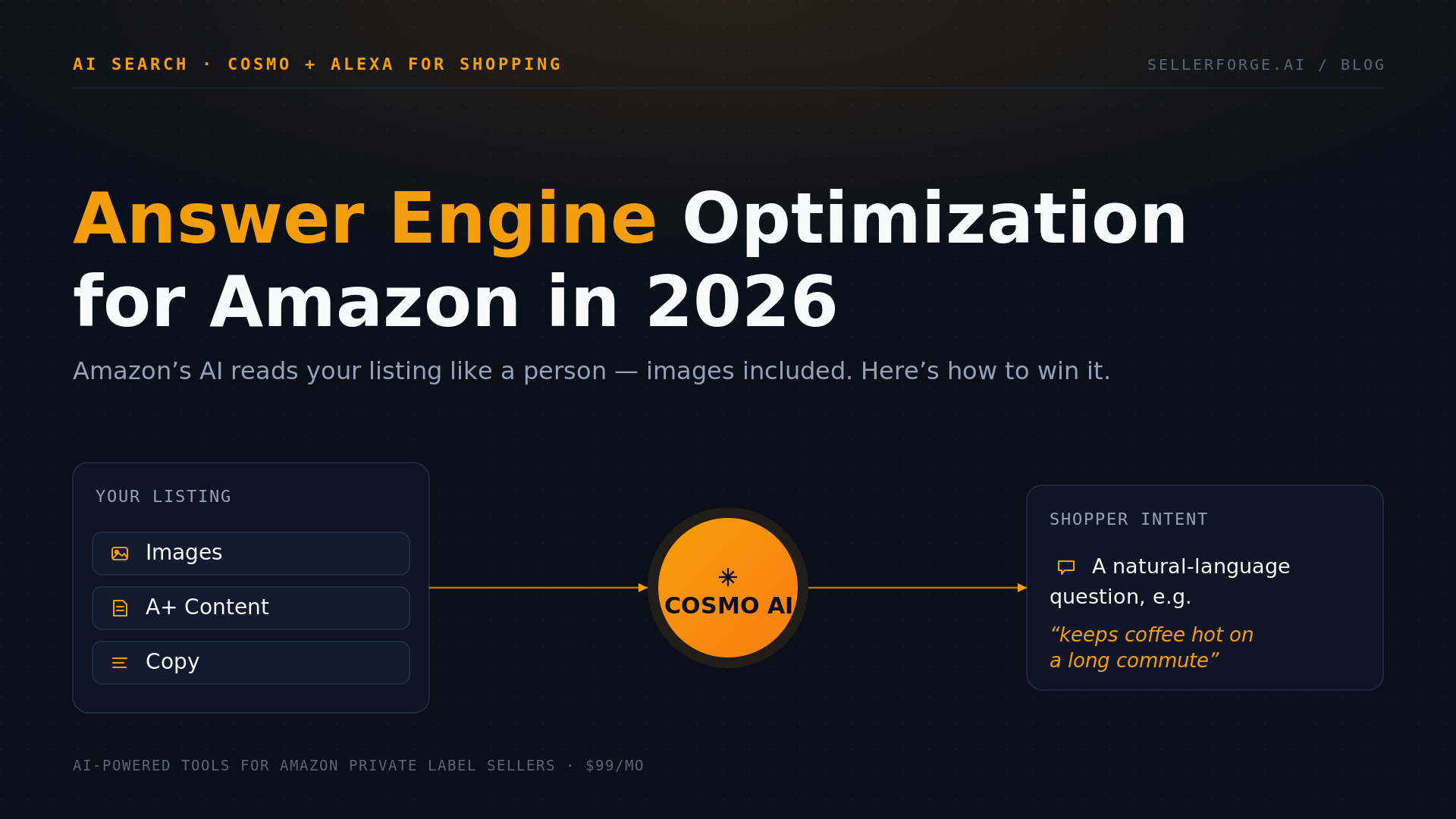
Alexa for Shopping mediates a growing share of mobile queries. Amazon's AI shopping assistant lets shoppers ask conversational questions like "what's the best travel stroller for a six-month-old that fits in airplane overhead bins?" instead of typing fragmented keywords. Alexa for Shopping reads your entire listing — title, bullets, A+ Content, review content, Q&A, and backend attributes — and decides whether your product actually fits the question. It's not running A9-style keyword matching. It's running a small-LLM evaluation. Listings that answer real questions naturally win; listings that read like keyword garbage lose.
A10 weights conversion velocity over keyword presence. The A9 era rewarded keyword density. A10 (Amazon's current ranking algorithm under COSMO) rewards listings that actually convert — click-through rate from search, conversion rate after the click, repeat purchase, low return rate. Clarity beats density. The listing that converts at 15% will outrank a listing that converts at 8% even if the second listing has more keywords.
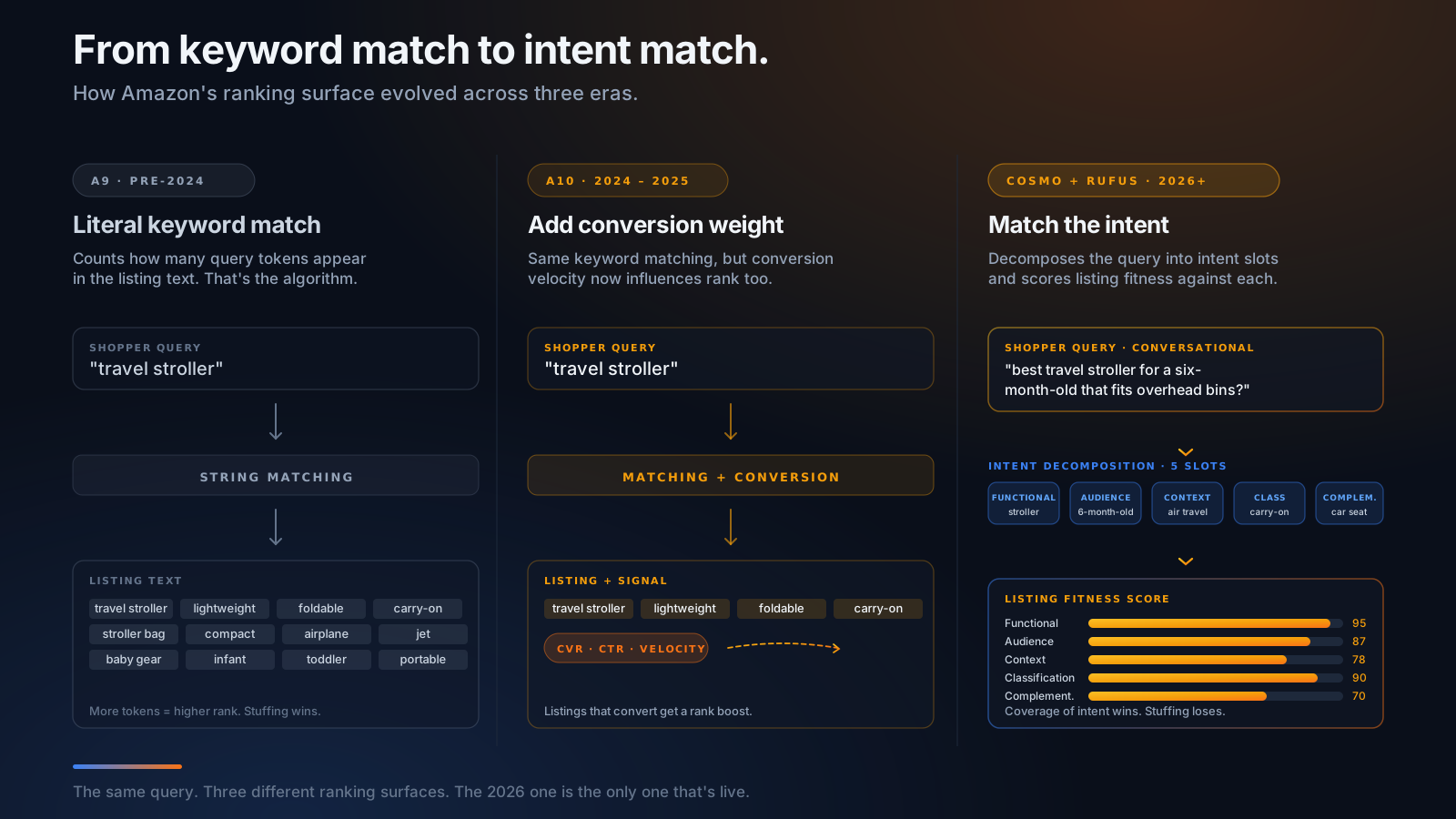
For sellers using AI to write listings, the practical translation is:
- Stop chasing keyword density. A listing that organically covers the top 10 intent variations for a product will outrank one that crams in 40 keywords.
- Write for the shopper question, not the keyword. Each bullet should answer a question someone actually asks in your category — "is this dishwasher safe?", "does it fit a King mattress?", "what's the weight capacity?". Alexa for Shopping reads bullets preferentially.
- First 70–80 characters of the title matter more than the next 120. That's the mobile cutoff. Most generic AI prompts write a fluent first sentence and then trail off into keyword soup that mobile shoppers never see.
- Compliance is enforced silently now. Image suppression is the new normal — listings with non-compliant images get hidden from search results without a notification. You won't know until your traffic drops.
The rest of this post assumes you understand this. The playbook from here forward is specifically for the COSMO + Alexa AI + A10 ranking surface, not the A9 era your favorite YouTube guru is still teaching.
What LLMs Are Actually Good At on Amazon Listings — and What They Get Wrong
Before you write a single prompt, calibrate expectations.
What LLMs are genuinely great at
Drafting at speed. A competent prompt produces a coherent first draft of a title + 5 bullets + description in under 30 seconds. Doing this by hand takes 2–4 hours.
Voice/tone variation. Switching from "outdoorsy/rugged" to "premium/minimalist" to "warm/family-friendly" is a one-line change in the prompt. By hand that's a full rewrite.
Long-tail keyword expansion. Given a few seed keywords and a product context, LLMs are excellent at generating the long-tail variations human writers miss — synonyms, regional alternatives, semantic neighbors.
Question coverage. "What are the top 5 questions a shopper would ask before buying this product?" is the single most useful prompt in the AI shopping assistant era and LLMs answer it better than most copywriters.
Image briefs. LLMs can write detailed, structured prompts for image generation tools (Midjourney, DALL-E, Sora) that produce on-brand product imagery much faster than commissioning a photographer.
Restructuring and refinement. Given a draft, "make bullet 3 more concise and lead with the benefit" works reliably.
What LLMs get wrong every single time
These are the failure modes you'll see in every "I used ChatGPT to write my listing" YouTube video, and they're all genuine, persistent problems:
Byte counting. LLMs cannot count bytes. They'll happily produce backend search terms at 320 bytes, which Amazon will reject silently — the entire backend field gets de-indexed if you go over 249.5 bytes by even one. Worse, LLMs use the wrong unit (characters instead of bytes), and accent marks, emoji, and non-Latin characters cost more than 1 byte each. Generic LLMs do not know this.
Banned superlatives. LLMs default to "best," "#1," "leading," "top-rated," "most popular," "highest-rated" because the open-web training data is dominated by content marketers who use these words constantly. Amazon explicitly forbids them in titles and bullets. A listing with "Best Travel Stroller" in the title is at risk of suppression.
Medical and health claims. LLMs cheerfully write "antibacterial," "cures dryness," "FDA-approved," "antimicrobial," "treats acne," "boosts immunity" — all of which are explicit policy violations unless you have the certifications Amazon requires. Generic LLMs do not check this.
Competitor brand names. LLMs hallucinate brand names confidently — "alternative to Stokke," "rivals Bugaboo," "compares to OXO" — every one of which is a policy violation that gets your listing pulled.
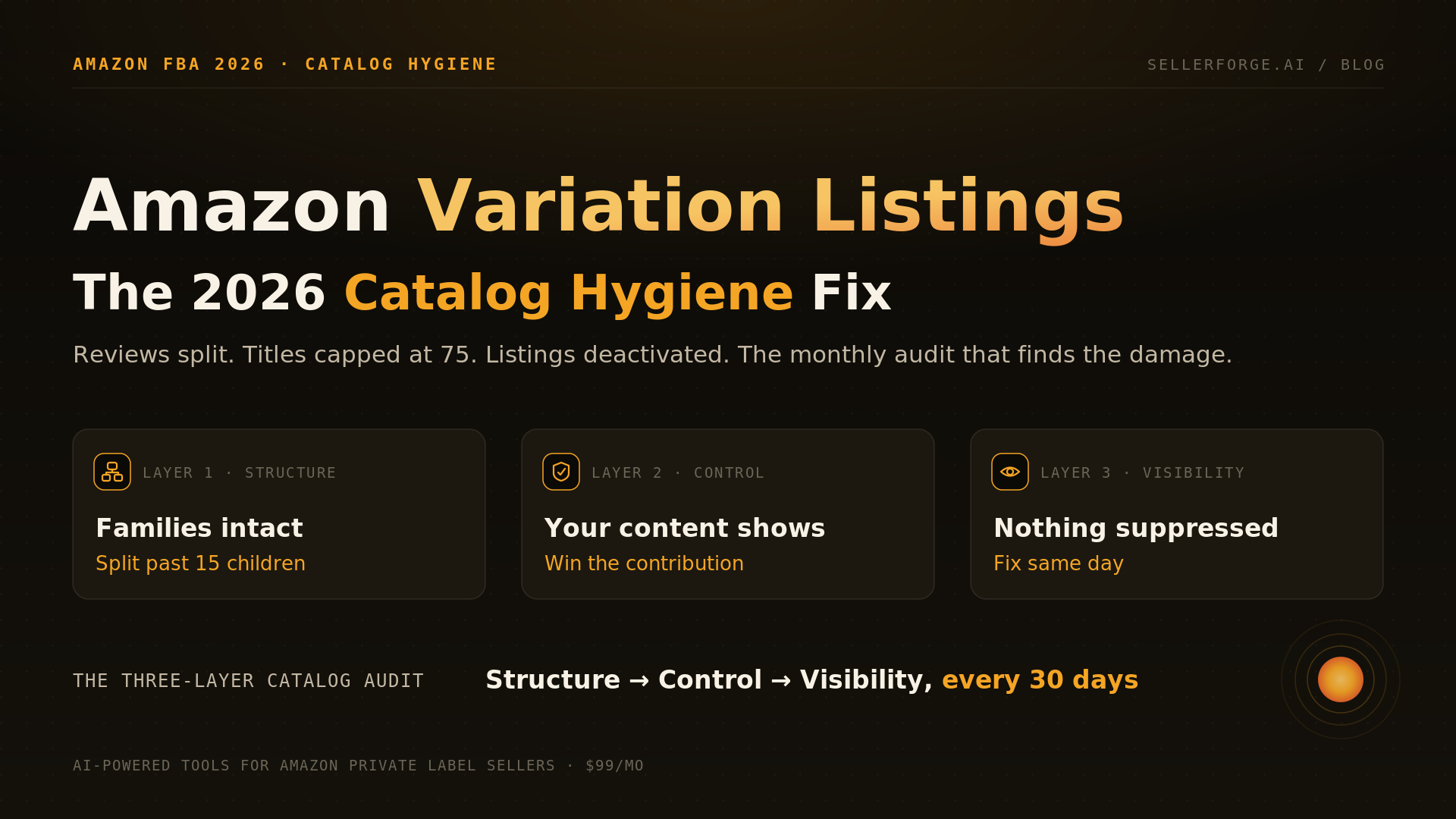
Title caps. Since July 27, 2026 the cap is 75 characters in every category except media — the old per-category limits (200 default, 150 Electronics, 125 Apparel, 80 Baby/Pet) are gone. Generic LLMs trained on years of 200-character Amazon titles still write 200-character titles. Every one of them now ships over-cap, and over-cap titles get rewritten by Amazon's AI without your input. Prompt for 75 characters explicitly and move overflow into the 125-character Item Highlights attribute, which is indexed.
Brand Registry vs non-brand-registered output. A+ Content modules require Brand Registry. If you're not brand-registered, your account doesn't have A+ enabled. Generic LLMs will write A+ modules for you anyway, and there's nothing you can do with them. Conversely, brand-registered sellers who only get a plain description from their LLM are leaving the highest-leverage conversion-rate lever on the table.
Backend keyword duplication. Amazon ignores backend keywords that already appear in the title or bullets. Generic LLMs don't have a way to dedupe against the front-end content — they'll happily duplicate your title keywords into the backend, wasting your 249.5-byte budget.
Image compliance. LLM-generated image prompts almost always include "text overlay," "watermark," or "logo" details that violate Amazon's main-image policy. The main image must be a pure-white background photograph of the physical product. Most AI image generators default to lifestyle/composited output.
The front-load discipline still applies. The 75-character cap roughly matches the old mobile truncation point, so the skill that mattered before — primary keyword and differentiator in the opening characters — is now simply the whole title. LLMs left to their own devices still write a fluent warm-up phrase before the substance; at 75 characters there is no room for a warm-up.
You can fix all of this — but only if you know it's broken. That's the entire reason most "AI Amazon listings" end up underperforming hand-written ones. The LLM is doing exactly what you asked, and what you asked for is exactly the wrong thing for 2026 Amazon.
The 4-Stage AI Workflow
The right way to use AI for Amazon listings is not a single prompt. It's a four-stage workflow with a different role for AI at each stage.
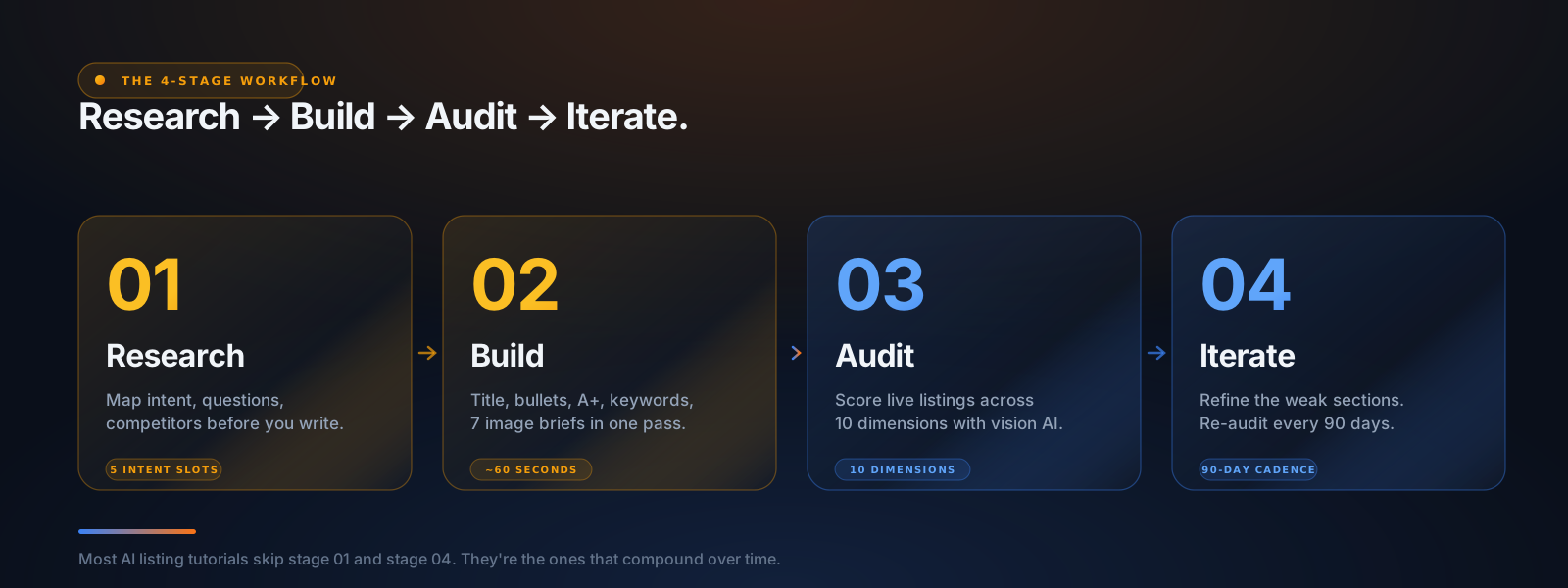
Stage 1 — Research. Before you write a single bullet, use AI to map the intent space around your product. What are the top 10 questions shoppers ask? What are the 15 most relevant intent slots in COSMO terms? Who are your top 5 competitors and what are they doing well and badly? This is where most sellers skip ahead — and it's the most important stage.
Stage 2 — Build. Generate the full listing — title, 5 bullets, description (or A+ Content modules if you're brand-registered), backend search terms, and image briefs — in one structured pass. The output should be ready to ship to Seller Central after a human review, not a "first draft you then rewrite."
Stage 3 — Audit. For listings that are already live, use AI with vision capability to score the listing across 10 dimensions (title, bullets, description, A+, images, keywords, pricing, COSMO readiness, Alexa AI readiness, compliance). The audit identifies the specific sections that are dragging conversion down and produces rewrite recommendations.
Stage 4 — Iterate. Listings decay. The category evolves. Competitors copy you. New COSMO intent slots emerge. Re-audit every 90 days, refine the underperforming sections, re-push to Amazon, and track score-over-time.
Most sellers run Stages 1 and 2 once and then forget. The compound win comes from running Stages 3 and 4 quarterly. We'll cover each stage in depth below.
Stage 1 — Research the Category With AI Before You Write a Word
If you skip Stage 1, every later stage is built on guesses. The research stage takes 20 minutes and changes the quality of everything downstream.
The research stage has three sub-tasks: intent mapping, question coverage, and competitor analysis.
Intent mapping with AI
The point of intent mapping is to make the COSMO relation types explicit before you write. For a "pour-over coffee kettle," the intent map looks like:
- Functional — what does the product do? (heat water precisely for pour-over coffee, control flow rate, hold ~1L)
- Audience — who is it for? (home baristas, third-wave coffee enthusiasts, gift recipients for coffee lovers)
- Context — when and where is it used? (morning coffee routine, weekend brewing, gifts for housewarming/holidays)
- Classification — what is it? (gooseneck kettle, pour-over equipment, kitchen specialty appliance, manual brewing tool)
- Complementary — what pairs with it? (pour-over drippers, scale, burr grinder, specialty coffee, paper filters)
Prompt that works:
"I'm writing an Amazon listing for {product description}. Generate a COSMO intent map for this product covering five categories: Functional, Audience, Context, Classification, and Complementary. For each category, list 5–8 specific intents a shopper might have. Be specific — don't say 'coffee lovers,' say 'home baristas brewing third-wave specialty coffee daily.' Avoid generic marketing language."
The output is the spec sheet for your listing. Every intent on this map needs to show up somewhere in the title, bullets, or A+. Coverage of the intent map is what COSMO actually measures.
Question coverage with AI
Alexa for Shopping reads your listing and answers shopper questions from it. The bullets that explicitly answer common questions get cited preferentially in its responses. The bullets that talk about "premium quality materials" get ignored.
Prompt that works:
"What are the top 15 questions a shopper would ask before buying {product description}? Include both pre-purchase questions ('does it fit X?') and post-purchase concerns ('is it dishwasher safe?'). Sort by likely search volume. Don't include generic questions like 'is it good?' — be specific to this category."
Every question on the top 5–7 of this list should be answered in your bullets. Literally. "DISHWASHER SAFE: All components are top-rack dishwasher safe — no hand-washing required after morning use." Alexa for Shopping reads that pattern preferentially because it matches its own internal training data.
Competitor analysis with AI
For competitor analysis, you need the LLM to look at real listings — which means either pasting them in manually, using a tool with built-in scraping, or using a multimodal LLM with vision to read screenshots.
Prompt that works (paste in the top 5 competitor listings' title + bullets):
"Below are the title and bullets from the top 5 competitor listings in my category. For each, identify: (1) what intent the listing emphasizes most, (2) what intent it ignores, (3) any keywords it stuffs unnaturally, (4) any compliance issues you can spot, (5) the strongest sentence in the listing. Then synthesize: what's the white-space opportunity I should hit that they're all missing?"
The output is a competitive positioning map. The white-space opportunity is where you should lean — that's the intent space the algorithm hasn't satisfied for shoppers yet.
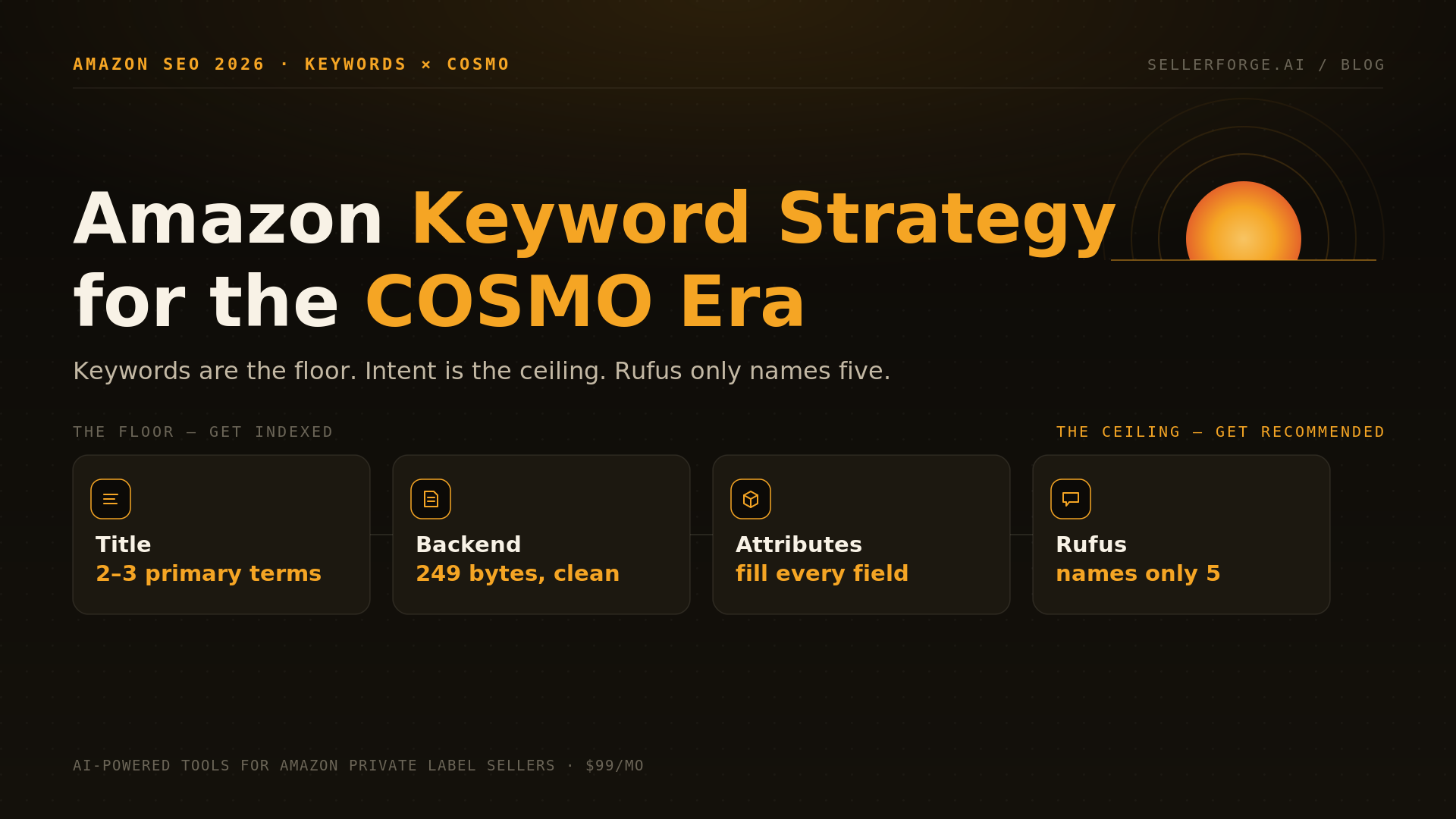
For the full research-to-indexing system behind this stage — intent clusters, keyword tiering, and the Floor-and-Ceiling model — see our Amazon keyword strategy playbook for the COSMO era.
Stage 2 — Build the Listing With AI
This is the stage everyone wants to skip to. Do not skip Stage 1. The build prompts below assume you have the intent map, question list, and competitive positioning from Stage 1 ready to paste in.
Building the title
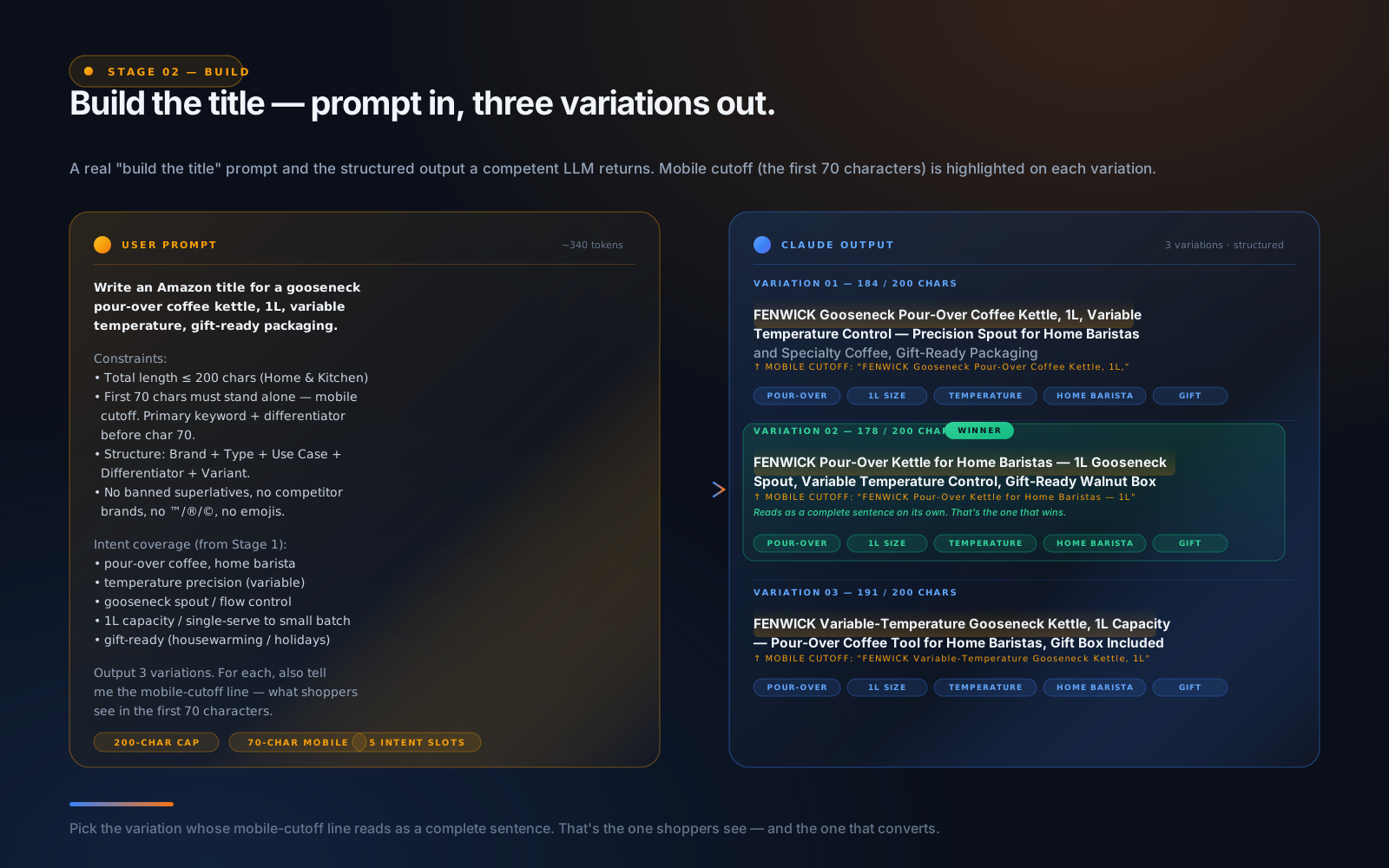
The title is the highest-leverage piece of copy on Amazon, especially under COSMO. It has to (1) include the primary intent keyword in the first 70 characters, (2) cover 3–5 secondary intents, (3) communicate the differentiator, (4) respect category-specific caps, (5) avoid banned superlatives.
Prompt that works:
"Write an Amazon title for {product}. Constraints: total length ≤ {category cap} characters (e.g. 200 for Home & Kitchen, 150 for Electronics, 125 for Apparel, 80 for Baby Products and Pet Supplies). First 70 characters must stand alone — that's the mobile cutoff. The primary keyword and key differentiator must appear before character 70. Use this structure: Brand + Product Type + Primary Use Case + Key Differentiator + Variant. No banned superlatives, no competitor brand names, no emojis or special characters (™, ®, ©). Cover these intents from my intent map: {paste top 5 from Stage 1}. Output 3 variations. For each, also tell me the mobile-cutoff line — what shoppers see in the first 70 characters."
Pick the variation where the mobile-cutoff line itself reads well as a standalone sentence. That's the version that wins.
Building the bullets
The 5 bullets are where most of the COSMO intent coverage and Alexa for Shopping question-answering happens. Each bullet should follow a specific structure: ALL-CAPS lead label + colon + benefit-first sentence with the feature as supporting evidence.
Prompt that works:
"Write 5 Amazon bullet points for {product}. Each bullet 200–250 characters. Each bullet starts with an ALL-CAPS lead label of 2–4 words, then a colon, then the body. First 80 characters of each bullet must deliver the benefit before the colon ends. Lead with the BENEFIT, then justify with the FEATURE — never the reverse. Each bullet should answer one of these top-5 shopper questions: {paste Q1-Q5 from Stage 1}. Use long-tail keywords from the intent map naturally — do not stuff. No banned superlatives, no medical/health claims, no competitor brand names. For each bullet, also tell me which intent and which question it covers."
The output is 5 bullets with explicit traceability to intents and questions. That's the audit-ready format.
Building the description (non-brand-registered)
If you're not Brand Registered, the description is your only space for long-form narrative below the bullets. 2,000 characters, plain text only, no HTML.
Prompt that works:
"Write a 2,000-character Amazon product description for {product}. Plain text only — no HTML, no formatting characters. Open with a one-sentence positioning statement. 3–4 short paragraphs covering: who it's for, the primary use case, the key differentiators (with supporting specifics), and what's in the box. Cover these intents from my map: {paste any not already covered in title and bullets}. Include long-tail keyword variations naturally. Close with a brand value statement (mission, warranty, or commitment). No banned superlatives, no medical claims, no competitor brands, no promotional language. Output the description with a character count at the end."
Building the A+ Content (Brand Registry only)
If you're Brand Registered, you're writing A+ Content modules instead of a description. A+ doesn't index for search, but it's the highest-leverage conversion-rate lever Amazon offers — Basic A+ lifts sales ~8% on average, Premium A+ up to ~20%.
A+ requires module-by-module structure. The standard Brand Story + 5 module Basic A+ stack:
- 1Brand Story Module (cross-listing, set once per brand) — your brand origin and mission.
- 2Standard Header Image + Text — your hero positioning, with a high-resolution lifestyle hero image.
- 3Standard Three Image + Text — your three key differentiators with supporting imagery.
- 4Standard Comparison Chart — your product vs. 2–4 of your other products (or alternative options in the category). Critical for upsell.
- 5Standard Four Image + Text Quadrant — feature highlights with iconography.
- 6Standard Single Image + Specs Table — technical specs in a scannable format.
If you've qualified for Premium A+ (Brand Story published across all listings AND at least 5 approved Basic A+ submissions in the past 12 months), you have access to interactive carousels, hover-zoom, and 3-minute video modules.
Prompt that works:
"Write Amazon A+ Content modules for {product}. I'm Brand Registered with {Basic / Premium} A+ access. Use this 6-module stack: Brand Story, Standard Header Image + Text, Standard Three Image + Text, Standard Comparison Chart, Standard Four Image + Text Quadrant, Standard Single Image + Specs Table. For each module, give me: (1) the body copy at Amazon's per-module limits, (2) a specific image prompt (subject, composition, lighting, color treatment, mood) ready to paste into Midjourney or another image generator, (3) the intent slots from my map that this module covers. No banned superlatives, no medical claims, no competitor brands."
The result is a complete A+ build you can paste section-by-section into Amazon's A+ Builder, plus image prompts for the visual production.
Building the backend search terms
This is where every LLM-only workflow falls down. The 249.5-byte limit is the most violated rule on Amazon. Most LLM-generated backend keywords are either way over budget (and silently de-indexed) or way under (leaving discoverability on the table).
Prompt that works:
"Write backend search terms for {product} on Amazon. Hard cap: 249 bytes total. Most ASCII characters are 1 byte each, accented characters are 2 bytes, Japanese/Chinese are 3 bytes, emoji are 4+ bytes. Stay under 249 bytes — going over by ONE byte silently de-indexes the entire field. Separator: single space between terms (commas waste bytes). Do NOT repeat words that already appear in the title or bullets. Here's what's in the title and bullets: {paste title + 5 bullets}. Include synonyms, regional variations, common misspellings, and use-case phrases. No competitor brand names, no profanity, no promotional language. Output the keywords and tell me the exact byte count (count manually — don't estimate)."
Critically, the LLM will get the byte count wrong. You must verify it yourself. Open a byte counter (e.g. mothereff.in/byte-counter) and paste the output. If it's over 249, ask the LLM to cut a specific number of bytes. Don't trust the LLM's own count.
This is the single biggest reason generic LLMs fail at Amazon listings — they cannot count bytes, and one byte over silently kills your discoverability. Tools that can count bytes server-side (like SellerForge Listing Builder) solve this completely; raw LLM workflows do not.
Stage 3 — Build the Image Stack With AI
Images drive CTR. CTR drives ranking. The image stack is half the listing — and it's where most AI-using sellers run into the most aggressive 2026 enforcement.
The 7-slot image strategy
Amazon allows 9 image slots, but the optimal stack — confirmed across thousands of category-leading listings — is 7 images plus 1 product video.
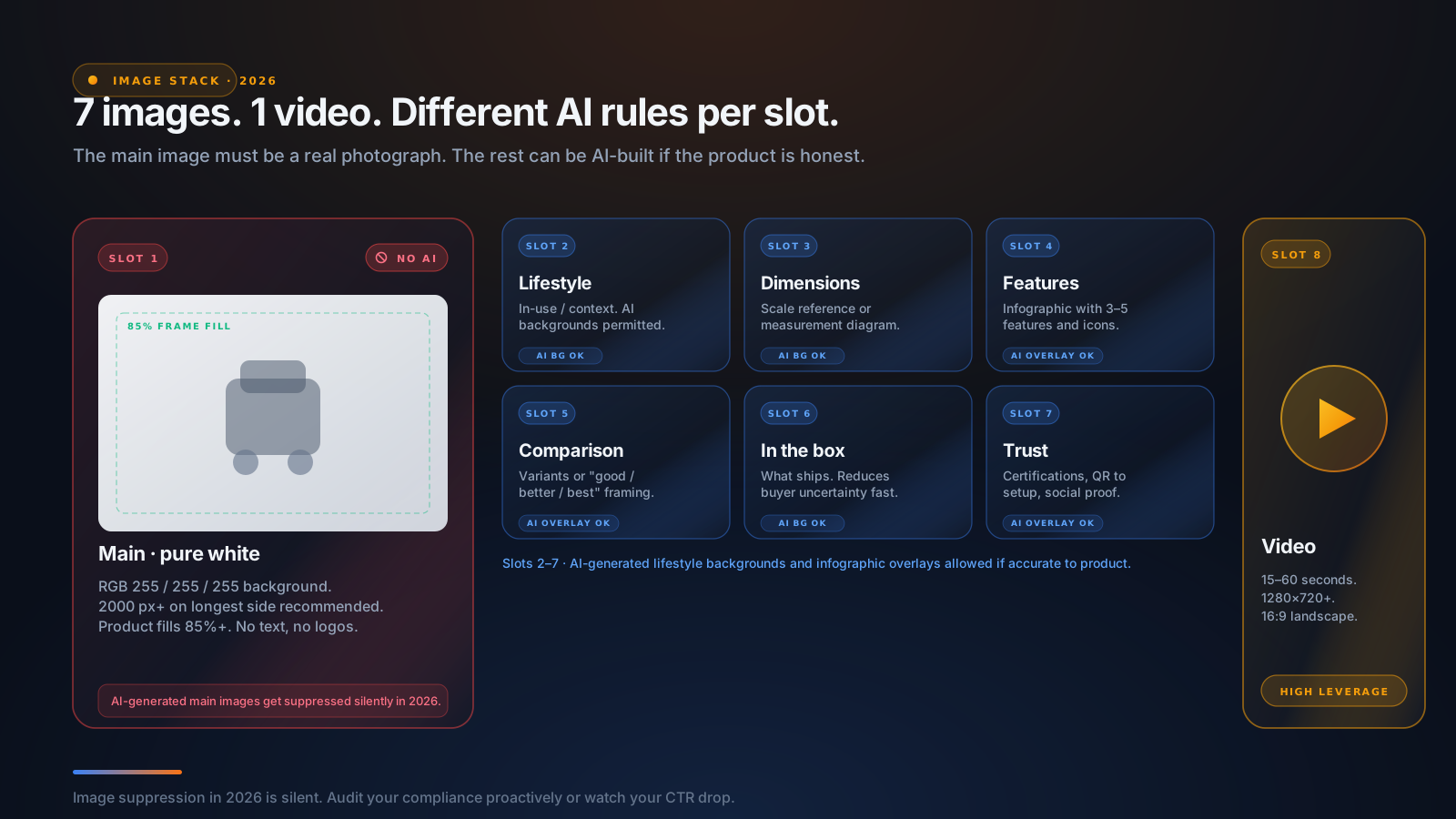
- Slot 1 (MAIN): Pure white background (RGB 255,255,255), product fills ≥85% of frame, no text, no logos, no watermarks, no AI-generated content. Amazon's 2026 policy explicitly does NOT allow AI-generated main images.
- Slot 2: Lifestyle / in-use. Real context. AI-generated backgrounds permitted IF they accurately represent the product in a realistic context.
- Slot 3: Dimensions / scale reference. A diagram with explicit measurements or the product next to a familiar reference object (a hand, a coffee cup, a phone).
- Slot 4: Feature highlights infographic. 3–5 features with iconography and short text callouts.
- Slot 5: Comparison or variants. Side-by-side with your other products or with a "good/better/best" framing.
- Slot 6: What's in the box / packaging. Reduces buyer uncertainty.
- Slot 7: Trust / social proof / instructions. A QR code to setup guide, a certifications strip, or an unboxing micro-scene.
- Slot 8 (video): 15–60 second product demo video, 1280×720 minimum, 16:9 landscape.
Amazon's 2026 AI image policy — the rules that get listings suppressed
This is the single most enforced policy area in 2026. The rules:
- 1Main image must be a real photograph of the physical product on pure white. AI-generated main images get suppressed silently.
- 2Secondary images can include AI-generated lifestyle backgrounds as long as the product itself is photographed accurately and the AI-generated context realistically represents how the product is used.
- 3AI-generated design elements are allowed in infographic overlays — text layouts, icon compositions, background gradients.
- 4AI disclosure is required if AI was used substantially — particularly for lifestyle compositions. Amazon recommends placing the disclosure near the beginning of the product description.
- 5Image suppression is silent. You won't get an email. Your traffic just drops. Audit your image compliance proactively.
The compliant workflow most successful sellers use in 2026:
- Photograph the product professionally on a pure white background for Slot 1 and a clean studio setup for the product portions of slots 2–7.
- Use AI tools to generate the backgrounds, scenes, infographics, and design overlays in slots 2–7, then composite the real product photograph onto those backgrounds.
- Disclose AI usage in the description ("Lifestyle images may include AI-generated backgrounds; the product photographed is the actual product shipped").
Using AI to write the image prompts
Even if you're not using AI to generate the images themselves, AI is the fastest way to write detailed image briefs for your photographer or for tools like Midjourney/DALL-E/Sora.
Prompt that works:
"Write 7 detailed image briefs for an Amazon listing for {product}, one per slot in the 7-slot strategy. For each, give me: (1) the composition (subject placement, framing, angle), (2) the lighting (key light position, fill, shadows), (3) the mood/color treatment, (4) the text overlays if any (main image must have NO text), (5) a Midjourney-ready prompt I can copy and run, (6) the intent slots from my COSMO map this image covers. Constraints: Slot 1 must be a real photograph (no AI generation). Slots 2–7 can have AI-generated backgrounds. No watermarks, no logos overlaid on the main image, no promotional text."
The output is a complete shoot brief or a complete Midjourney prompt set for the entire listing in one pass.
Stage 4 — Audit Existing Listings With AI
If you have a listing that's already live and underperforming, the workflow flips. Instead of writing from scratch, you're using AI as a diagnostic tool.
What a good AI audit covers
A real Amazon listing audit covers 10 dimensions:
- 1Title — character count, mobile cutoff fitness, banned terms, intent coverage, keyword placement.
- 2Bullets — character counts, ALL-CAPS lead pattern, benefit-first ordering, question coverage, byte-budget for the first 1,000 indexed bytes.
- 3Description — character count, intent coverage of intents not already in title/bullets.
- 4A+ Content (if Brand Registered) — module-by-module evaluation.
- 5Images — main image compliance, slot coverage, scale references, infographic quality, AI policy compliance, mobile thumbnail readability.
- 6Backend search terms — byte count, duplication against front-end, keyword diversity, banned terms.
- 7Top keyword analysis — what keywords you should rank for vs. what you currently target.
- 8COSMO semantic readiness — coverage of the 15 relation types across your listing copy.
- 9Alexa AI readiness — question coverage in bullets, conversational query fitness.
- 10Pricing — competitiveness vs. category, alignment with positioning.
The audit produces a score per dimension (0–100), a list of specific issues with severity, and rewrite recommendations.
The vision requirement
Critically: a real audit requires vision. You need an LLM with image-understanding capability to score the actual images, not just the metadata. Claude (Sonnet and Opus) and GPT-4o have this. Most cheaper LLMs don't.
Prompt that works (paste in the title, bullets, description, backend keywords, and attach the listing images):
"Audit this Amazon listing across 10 dimensions: title, bullets, description, A+ Content (if any), images (analyze each image visually), backend search terms, top keyword coverage, COSMO semantic readiness, Alexa AI readiness, and pricing position vs the category. For each dimension: (1) score 0–100, (2) list the top 3 specific issues with severity (critical / warning / info), (3) provide a specific rewrite recommendation for the worst issue, (4) estimate the conversion impact of fixing it. Then output a prioritized action plan: which fixes deliver the most upside, and in what order should I tackle them?"
The audit takes ~2 minutes on a capable model. Re-run it after every change to track score-over-time.
The hard part: scoring the images
Image scoring is where generic LLM audits fall apart. Claude with vision can identify whether the main image is compliant (white background, product fill percentage, presence of text), but it can't pin a specific recommendation onto a specific pixel coordinate the way a purpose-built audit tool can.
This is one of the harder pieces to do well with raw LLM workflows, and it's where the SellerForge Listing Audit module pulls ahead — it overlays specific annotation pins directly on the product images pointing to "background not pure RGB 255,255,255" or "product fills only 68% of frame, needs 85%."
If you're doing it with raw Claude, the best you can do is screenshot each image, paste it in, and ask for a structured critique. That works for 60% of the value. The remaining 40% — the visual annotations — requires either a purpose-built tool or a custom build. (Pre-Prime Day 2026 is the highest-ROI audit window each year — listings get the most traffic during Prime Day and small fixes compound.)
The 8 Compliance Traps AI Gets Wrong (And How to Catch Them Before Amazon Does)
These are the specific compliance failure modes that turn an AI-generated listing into a suppressed listing. Run a final compliance pass before you ship anything.
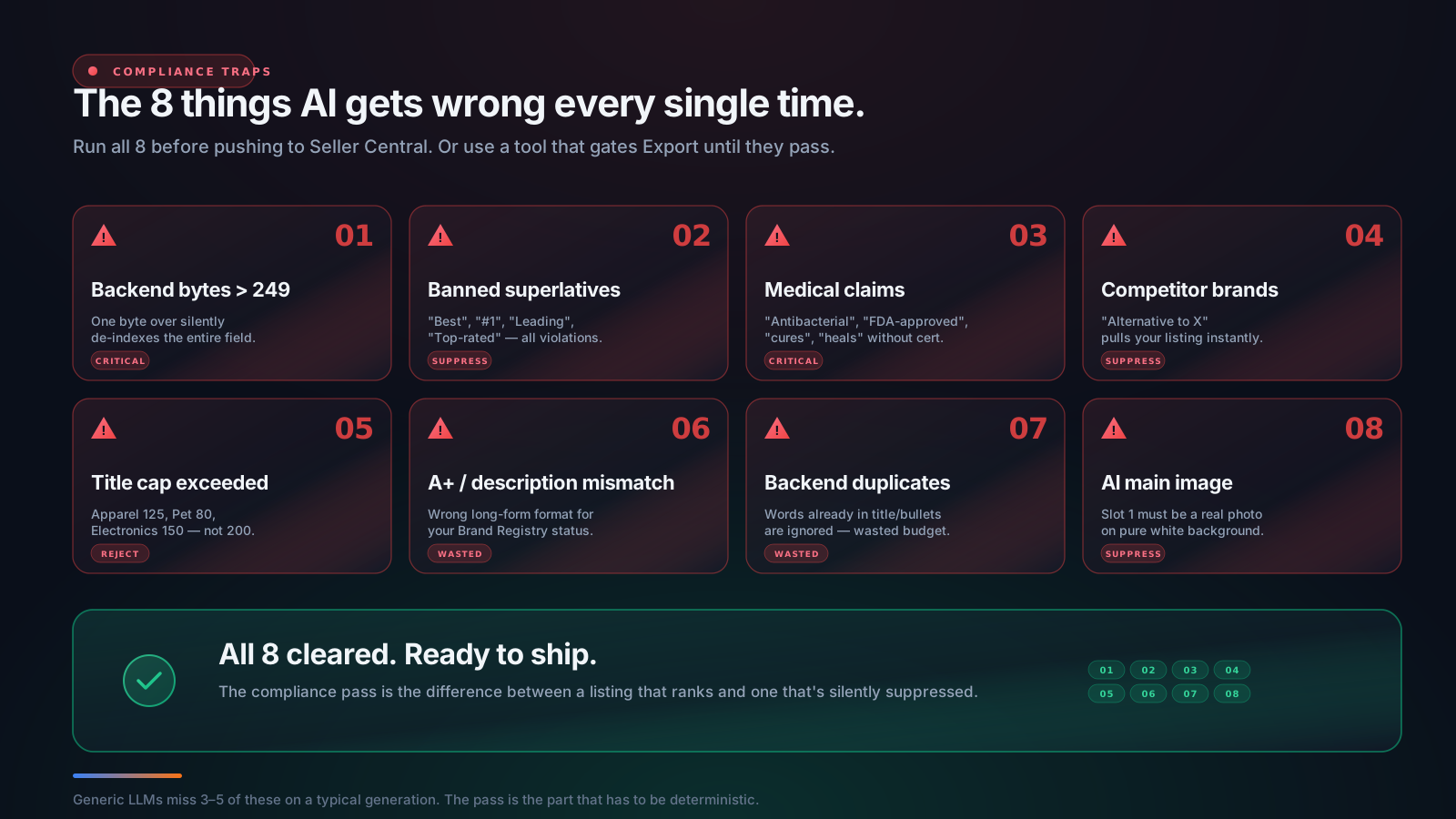
1. Backend bytes over 249.5. The killer rule. One byte over and the entire field is silently de-indexed. Verify with a byte counter, not the LLM's own count.
2. Banned superlatives. "Best," "#1," "Leading," "Top-rated," "Most popular," "Premium" used as an adjective ("Premium leather grip"). Replace with specific evidence — "12-oz capacity," "6-month battery," "Tested to 200 lb."
3. Medical and health claims. "Antibacterial," "antimicrobial," "FDA-approved," "cures," "treats," "heals," "boosts immunity," "prevents." All policy violations unless you have documented certification. Even soft variants like "supports immune function" trip the filter in some categories.
4. Competitor brand names. "Compares to Stokke," "alternative to OXO," "rivals Bugaboo." All grounds for listing suppression. Use generic category names instead.
5. Category-specific title caps. Default 200 chars, but: Electronics 150, Apparel 125, Baby Products and Pet Supplies 80. LLMs default to 200 — manually check against your category cap.
6. A+ vs description mismatch. Brand-registered → write A+ modules. Not brand-registered → write a description. Mixing them is a guaranteed mistake.
7. Backend keyword duplication. Backend keywords that already appear in the title or bullets are ignored. Dedupe against your front-end content.
8. AI-generated main image. Slot 1 must be a real photograph on pure white. AI-generated main images are explicitly prohibited in 2026 and trigger silent suppression. Photograph the product. Use AI only for backgrounds in slots 2–7.
The compliance pass is the last thing you do before pushing to Seller Central, and it's the thing 90% of "AI listing" workflows skip. Run all 8 manually, or use a tool with a deterministic validator (which is what SellerForge Listing Builder gates the Export button behind — if any compliance check fails, you can't export until you fix it).
Prompt Templates That Actually Work
A consolidated library of the prompts above plus a few I haven't covered yet. Copy these as starting points and adapt to your category.
The COSMO intent map prompt
Write a COSMO intent map for my Amazon product: {product description, key features, target audience}. Structure the map across the 5 COSMO categories: Functional, Audience, Context, Classification, Complementary. Give me 5–8 specific intents per category. Be concrete — don't say "coffee lovers," say "home baristas brewing third-wave specialty coffee daily." Output as a clean bullet list under each header.
The Alexa for Shopping question coverage prompt
List the top 15 questions an Amazon shopper would ask before buying my product: {product description}. Mix pre-purchase ("does it fit X?", "is it compatible with Y?") and post-purchase concerns ("is it dishwasher safe?", "what's the warranty?"). Sort by likely search volume. Skip generic questions ("is it good?") — be specific to my category.
The title prompt (with category cap)
Write an Amazon title for {product}. Constraints: total length ≤ {category cap}. First 70 chars must stand alone with the primary keyword and key differentiator. Structure: Brand + Type + Primary Use Case + Differentiator + Variant. No banned superlatives, no competitor brand names, no emojis or special characters. Cover these intents from my COSMO map: {paste top 5}. Output 3 variations plus the mobile-cutoff line for each.
The 5-bullet prompt
Write 5 Amazon bullet points for {product}. Each bullet: 200–250 characters, ALL-CAPS lead label (2–4 words) + colon + benefit-first sentence. First 80 chars must deliver the benefit. Each bullet answers one of my top 5 shopper questions: {paste Q1–Q5}. Cover these intents: {paste from COSMO map}. No superlatives, no medical claims, no competitor brands. For each bullet, tell me which intent and which question it covers.
The description prompt (non-brand-registered)
Write a 2,000-character Amazon description for {product}. Plain text only. One-sentence positioning opener, 3–4 short paragraphs covering: who it's for, primary use case, key differentiators with specifics, what's in the box. Cover the intents not already in title/bullets: {paste from COSMO map}. Close with a brand value statement. No superlatives, no medical claims, no competitor brands, no promotional language. End with character count.
The A+ Content prompt (brand-registered)
Write A+ Content modules for {product}, I have {Basic/Premium} A+. Build the 6-module stack: Brand Story, Standard Header Image + Text, Standard Three Image + Text, Standard Comparison Chart, Standard Four Image + Text Quadrant, Standard Single Image + Specs Table. For each module, give me: body copy at Amazon's per-module limits, a detailed Midjourney-ready image prompt, and the COSMO intents this module covers. No superlatives, no medical claims, no competitor brands.
The backend keywords prompt (byte-aware)
Write Amazon backend search terms for {product}. Hard cap 249 bytes (ASCII = 1 byte, accented = 2, Japanese = 3, emoji = 4+). Stay under 249 — going over by 1 byte silently de-indexes the entire field. Single space separators. Do NOT repeat words in my title or bullets (Amazon ignores duplicates) — here's the title + bullets: {paste}. Include synonyms, regional variants, common misspellings, use-case phrases. No competitor brands. Output the keywords and your byte count estimate (I will verify externally).
The 7-image-brief prompt
Write 7 image briefs for my Amazon listing: {product}. Slot-by-slot: 1) Main (pure white background — must be a real photograph, not AI), 2) Lifestyle / in-use, 3) Dimensions / scale, 4) Feature highlights infographic, 5) Comparison / variants, 6) What's in the box, 7) Trust / social proof / instructions. For each, give me: composition, lighting, mood/color treatment, text overlays if any (main slot has NO text), a Midjourney-ready prompt, and the COSMO intents it covers. AI-generated backgrounds OK for slots 2–7 if they realistically represent the product. No watermarks, no logos overlaid on main, no promotional text.
The audit prompt (paste copy + attach images)
Audit this live Amazon listing across 10 dimensions: title, bullets, description, A+ Content, images (analyze each visually), backend search terms, top keyword coverage, COSMO readiness, Alexa AI readiness, pricing position. For each: score 0–100, top 3 specific issues with severity, the worst issue's rewrite recommendation, the conversion impact estimate. Then a prioritized action plan: highest-upside fixes in order. Listing copy: {paste}. Images attached.
The compliance pass prompt
Run a compliance check on this Amazon listing copy. Flag any of: (1) backend keyword bytes over 249.5, (2) banned superlatives anywhere ("best," "#1," "leading," etc.), (3) medical or health claims, (4) competitor brand names, (5) title over the category cap of {category cap}, (6) A+ output when seller is not brand-registered (or vice versa), (7) backend keywords that duplicate title/bullets, (8) main image policy violations (if image provided). Listing: {paste}.
Why Generic ChatGPT and Claude Fall Short for Amazon Specifically
The prompts above will get you 70% of the way there with raw ChatGPT or raw Claude. That's a meaningful improvement over manual writing. But here's where the gap shows up:
The byte-counter problem. No general-purpose LLM has a reliable byte counter. You'll be over the 249.5-byte cap roughly 40% of the time and you won't know it until your traffic drops. The only fix is to verify externally every single time, which adds friction and breaks the workflow.
The compliance-gating problem. A general-purpose LLM has no incentive to refuse a non-compliant output. It'll happily write "Best Sleep Aid for Anxiety" — both a banned superlative AND a medical claim — and present it as a finished listing. You have to know to check, and you have to know what to check for.
The Brand-Registry-branching problem. General LLMs don't know whether you're Brand Registered. They'll write A+ modules for accounts that can't use them, or write a description for accounts that should be writing A+. The structural mismatch costs you the highest-leverage conversion lever Amazon offers.
The vision-and-annotation problem. General LLMs can describe an image, but they can't pin a specific recommendation to a specific coordinate ("background not pure RGB 255,255,255 — see the slight gray cast in the upper-right corner"). That's a vision-plus-domain-knowledge capability that requires either a purpose-built audit pipeline or many hours of careful manual screenshot review.
The retrievability problem. General LLMs are stateless. Every time you start a new conversation, you have to re-paste your COSMO map, your intent list, your competitor analysis, your category cap, and your Brand Registry status. A purpose-built tool stores all of that as account context once and reuses it.
The "trained on 2018 advice" problem. General LLMs were trained on the open web, which is dominated by 2018-era Amazon listing advice. Without explicit prompting about COSMO, Alexa for Shopping, mobile cutoffs, and the 2026 image policy, they'll default to the keyword-stuffing playbook. You have to fight the model on every prompt. (If you're curious how this gets fixed at the model layer, see build your own Amazon AI agent for the architecture.)
The image-generation policy problem. Generic image-generation tools (Midjourney, DALL-E, Sora) don't know Amazon's 2026 image policy. They'll happily generate an AI main image with text overlay on a gradient background — every part of which is a policy violation. You have to be the policy filter.
You can solve all of these with discipline. But "discipline at every step" is exactly the kind of thing humans fail at — especially in week 6 of running a portfolio of 30 SKUs. The shortcut, candidly, is to use a purpose-built tool that handles compliance, byte counting, Brand Registry branching, vision-based audit, and policy-aware image briefs by default.
The Shortcut: SellerForge Listing Builder + Listing Audit
SellerForge is the tool I built for this exact workflow. The Listings module is two pieces:
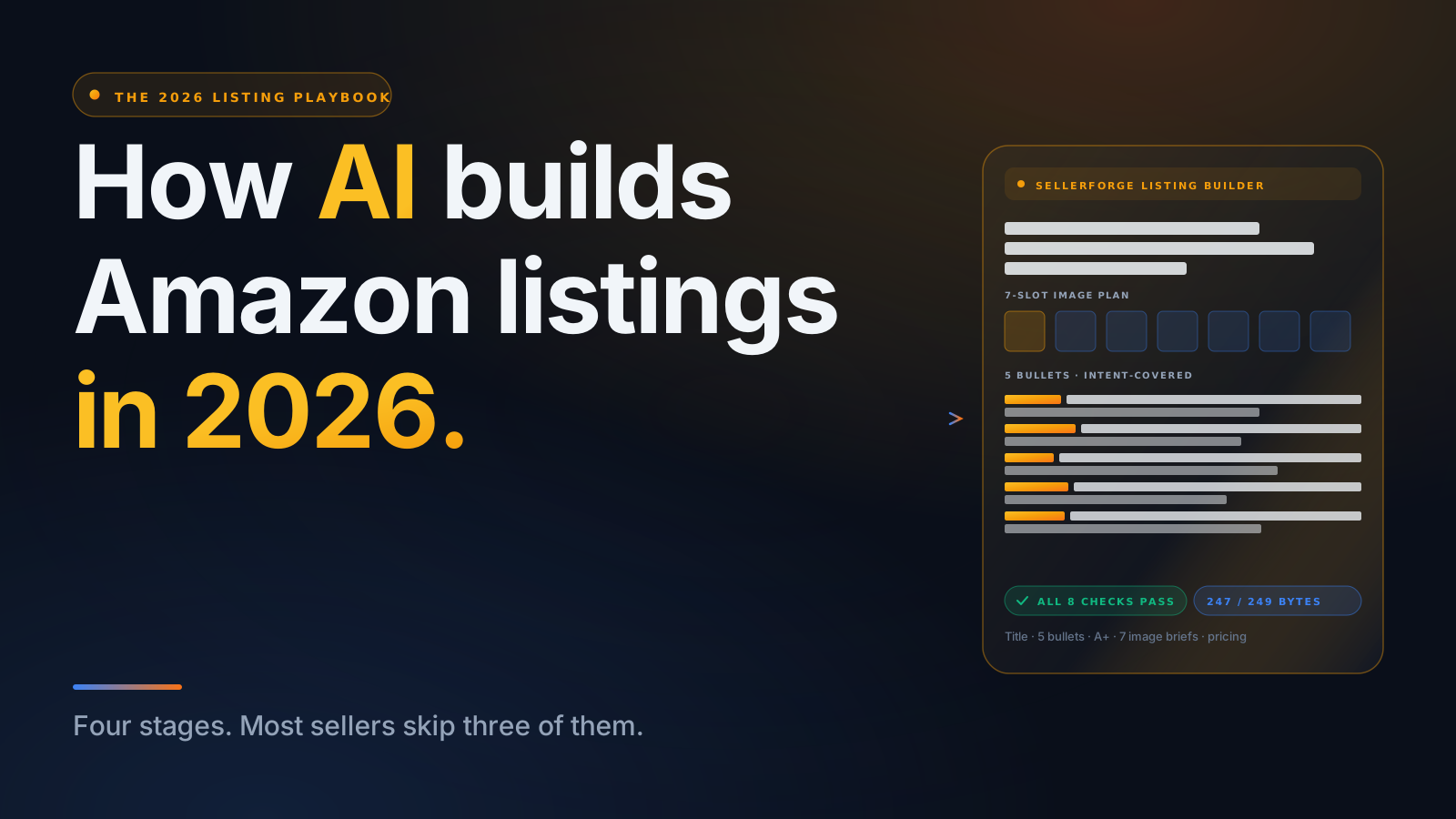
Listing Builder runs Stages 1 and 2 (research + build) in one structured pass. You give it a working product name, category, Brand Registry status, unit cost + target margin, and optionally upload reference photos / spec sheets / brand briefs. About 60 seconds later you get the title, 5 bullets, description OR full A+ Content modules (it branches automatically on your Brand Registry status), backend search terms within the 249-byte cap (server-verified), a 7-slot image brief plan with Midjourney-ready prompts, a 3-tier pricing recommendation, and a compliance scorecard. Export to Markdown, Amazon Flat-File, or PDF. If any compliance check fails, the Export button is disabled until you fix it.
Listing Audit runs Stages 3 and 4 (audit + iterate). Paste an ASIN (or paste the listing content if you're not SP-API connected) and Listing Audit runs Claude's vision API across every image, scores the listing across 10 dimensions, overlays specific recommendations directly on the product images (the visual-annotation feature no other tool has), and produces a prioritized action plan. Re-run any time — score-over-time tracks in the trend sparkline so you can see improvement.
Both are built on Claude (Sonnet for routine, Opus for image analysis and final compilation), with the 2026 ranking surface (COSMO + Alexa AI + A10) explicitly baked into the system prompt, plus deterministic validators for the compliance gating. The byte counter is real and runs server-side. The Brand Registry branching is automatic. The image policy is enforced.
Both modules are included in the $99/month SellerForge subscription along with ten other Amazon modules (POA Builder, Advertising, Forecasting, Reimbursement Claims, and others). There's a 7-day free trial with one full Listing Builder generation included.
If you want to see what the workflow looks like end-to-end before signing up, the Listings landing page has a sample output section showing every part of a real generated listing — title, bullets, A+ modules, backend keywords with byte count, the 7-slot image briefs, and the pricing tiers.
For sellers who'd rather DIY with raw LLMs: the prompts in Section 9 are honestly enough to get most of the way. The pieces SellerForge solves for you are (1) byte counting, (2) compliance gating, (3) Brand Registry branching, (4) image visual annotation, (5) score-over-time tracking, and (6) the 10 other modules that share the same underlying Claude infrastructure. If those don't matter for your scale, the manual workflow is viable.
If they do matter — particularly at 20+ SKUs where the discipline cost of manual compliance checking compounds — start a free trial.
Conclusion
Building Amazon listings with AI is one of the highest-leverage workflows available to sellers in 2026 — if you do it right. The research → build → audit → iterate workflow with explicit COSMO intent mapping, Alexa for Shopping question coverage, byte-budgeted backend keywords, category-correct title caps, Brand-Registry-aware long-form copy, and policy-compliant image briefs is what separates a listing that wins on day one from a listing that gets suppressed silently.
The shortcut, if you want it, is SellerForge. The Listings module (Builder + Audit) runs the entire four-stage workflow with compliance gating, byte counting, Brand Registry branching, and image visual annotation built in — plus ten other modules (POA Builder, Advertising, Forecasting, Reimbursement Claims, and more) on the same subscription. Free trial is seven days, includes one full Listing Builder generation, and connects to your real Seller Central account in under five minutes.
If you'd rather DIY, the prompts in this guide are honestly enough to get most of the way. Just don't skip the compliance pass — that's the single biggest difference between an AI-generated listing that ranks and an AI-generated listing that disappears.
About the author
David Gallo is the founder of SellerForge.ai. He previously managed 57 Amazon accounts and over $350M in sales at Worldfront before building SellerForge to give individual sellers agency-quality tools without the agency price tag.