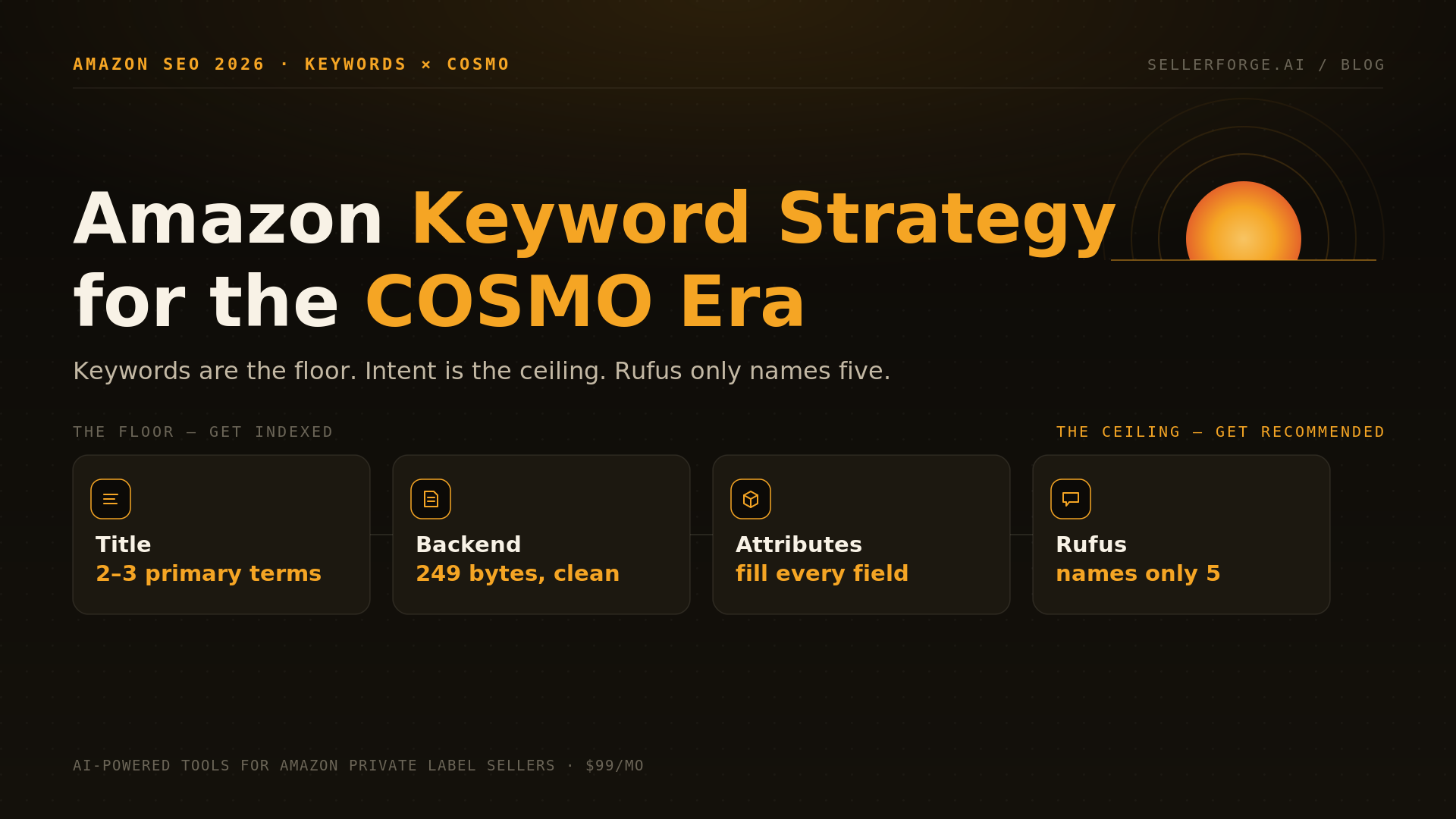
An effective Amazon keyword strategy in 2026 is a two-layer system: lock the lexical floor — one lead keyword in the 75-character title (the cap since July 27, 2026), secondaries in bullets and the 125-character Item Highlights field, a clean 249-byte backend field, indexing verified — then raise the semantic ceiling with complete structured attributes and intent-covering copy, because COSMO and Rufus now compress roughly 50 search results into about 5 recommendations. Keywords get you considered; intent data gets you recommended.
An Amazon keyword strategy in 2026 has two jobs, not one. Job one is the old one: get indexed for every term you deserve, because the lexical layer of Amazon's ranking engine still can't rank you for words it never matched. Job two is new: feed Amazon's semantic layer — COSMO, and the Rufus assistant built on top of it — enough structured intent data that the AI picks you when it compresses a page of fifty results into a recommendation of five.
Most sellers are still running a 2019 playbook against that 2026 stack. Across the 57 accounts I managed at Worldfront, keyword work had already calcified into a ritual: export a tool's volume list, sort descending, cram the top rows into the title, paste the leftovers into the backend field, never check indexing again. That ritual now fails in a new and expensive way — you can be perfectly indexed, ranked on page one, and still be invisible to the AI layer that a growing share of shoppers actually ask.
This playbook covers both jobs: the research workflow, where every keyword should live after the 2025 and 2026 policy changes, the backend field's unforgiving byte rules, how to verify Amazon indexed you, and the structured-attribute work that decides whether Rufus ever says your name.
Do Keywords Still Matter on Amazon in 2026?
Yes — keywords still matter on Amazon in 2026, but they've been demoted from strategy to prerequisite. Lexical matching still runs inside the A10 ranking layer, and a term you're not indexed for is a term you cannot rank for. What changed is the layer above: COSMO and Rufus now decide who gets recommended, and they read intent data, not keyword density.
The scale of that layer is no longer debatable. Amazon's Q4 2025 results, reported February 7, 2026, put Rufus at 300 million users with access and credited it with nearly $12 billion in incremental 2025 sales. On the October 30, 2025 earnings call, CEO Andy Jassy said shoppers who engage Rufus are 60% more likely to complete a purchase. During Black Friday 2025, Rufus handled 38% of Amazon sessions.
The number that should reorganize your keyword file, though, is five. Research published by Workflow Labs CEO Justin Leigh in April 2026 — covered in detail by PPC Land's analysis of the Rufus filter — found that where classic search returned a page of ~50 products for the shopper to browse, Rufus compresses discovery to roughly five named products per conversational answer. And the queries it captures skew high-intent: Tinuiti's research found 10-word conversational queries trigger AI responses about 68% of the time, versus 15% for single-word queries. The shopper who describes exactly what they want — the shopper every keyword strategy exists to catch — is increasingly answered by an AI shortlist, not a results page.
So the honest 2026 answer is: keywords are necessary and no longer sufficient. Treat the rest of this playbook as two workstreams — a floor you lock and a ceiling you raise.
How Does Amazon Search Actually Rank Products Now?
Amazon product discovery in 2026 runs through a three-layer stack. A10, the legacy engine, still processes lexical keyword matches, conversion rate, click-through rate, and sales velocity. COSMO, Amazon's semantic knowledge graph, classifies products by intent — reading structured backend attributes more heavily than consumer-facing copy. Rufus, the conversational layer on top, assembles roughly five recommendations from what COSMO classified as plausible answers.
| Layer | What it reads | What it decides | Your lever |
|---|---|---|---|
| A10 (lexical) | Title, bullets, backend search terms; CTR, CVR, velocity | Classic search rank for matched queries | Keyword placement + conversion quality |
| COSMO (semantic) | Structured attribute fields: intended_use, material_type, compatible_devices, target audience, dozens more | Whether your product is classified as a plausible answer to an intent | Attribute completeness + coherent intent coverage |
| Rufus (conversational) | Review sentiment, Q&A, listing coherence, price, Prime status, rating floors | Which ~5 products get named in the answer | Trust signals + proof the AI can quote |
The critical operational fact: the layers use different signals, so page-one rank does not carry over. A product optimized purely for keyword matching can win the A10 layer and fail COSMO's classification entirely. That's also why Amazon keeps restructuring listing data toward machine-readability — the April 2025 move to two-part product titles, separating core identification from marketing copy, was explicitly designed to help systems like COSMO and Rufus parse products.
One more cost pressure worth knowing: Sponsored Products and Sponsored Brands placements inside AI answers (Sponsored Prompts) exited beta and became billable on March 25, 2026. Paid visibility inside the assistant now costs CPC — which makes organic Rufus eligibility a line item with a real dollar value.
The Floor-and-Ceiling Keyword Model
The Floor-and-Ceiling Keyword Model is the simplest way to run this work in 2026. The floor is lexical: every term you deserve, indexed and verified — title, bullets, and the 249-byte backend field. The ceiling is semantic: how confidently COSMO can classify your product and how much proof Rufus can quote. Floor failures make you invisible; ceiling failures make you unrecommended.
The two layers fail differently, and diagnosing which one is failing you is half the job. A floor failure looks like zero impressions for a relevant query in Search Query Performance. A ceiling failure looks like healthy search rank with no presence in AI answers — considered, never chosen. The fix for the first is placement and byte hygiene. The fix for the second is data completeness and evidence, and no amount of keyword rearranging touches it.
The model in one line: keyword coverage gets you considered; intent data gets you recommended. Work floor-first — it takes an afternoon per ASIN — then spend the rest of the quarter on the ceiling.
My favorite floor-failure story from the Worldfront years: a supplements brand paying roughly $4,000 a month in PPC to defend a term their listing wasn't even indexed for organically — a bulk listing edit had silently rewritten their backend field over the byte limit. Nobody noticed for a quarter, because nobody was checking indexing. The fix took eleven minutes. That's the floor: boring, cheap, and catastrophic to skip.
How Do You Build the Keyword Floor? The 6-Step Workflow
Build the floor with a six-step loop: pull your own search-term and Search Query Performance data first, harvest competitor terms second, cluster everything by intent, tier by placement priority, place the terms by field rules, then verify indexing. The order matters — your own purchase data outranks any tool's volume estimate, because it's weighted by what actually converts for you.
- 1Pull your own data first. Brand Analytics → Search Query Performance shows the real queries generating your impressions, clicks, and purchases; your Sponsored Products search-term report shows which shopper phrasings already convert. These are money terms — they anchor the file.
- 2Reverse-ASIN your top 3–5 competitors. Any major keyword tool can list the terms competitors rank for that you don't. You're hunting gaps, not copying their file wholesale — half of what a stuffed competitor listing ranks for is noise.
- 3Cluster by intent, not volume. Group every term by the job the shopper is hiring the product for — "gift for new dad," "small-apartment storage," "sensitive-skin safe." COSMO thinks in intents; a cluster with modest volume but a single clear job often outperforms a big generic head term you'll never hold.
- 4Tier the file. Primary (one term, highest intent-to-volume ratio) → title. Secondary (5–8 supporting terms) → bullets and Item Highlights. Tertiary (synonyms, regional variants, misspellings you can't print) → backend field. Long-tail conversational phrasings → description and A+ text.
- 5Place by field rules — the next section, because the rules changed in 2025 and again in July 2026, and violating them costs indexing.
- 6Verify indexing within 72 hours of any edit, then re-harvest quarterly: SQP will surface new phrasings shoppers invent — feed them back into step 1.
A tiering judgment call from experience: when a primary keyword decision is close, take the term with the clearer intent over the bigger number. Volume you can't convert doesn't just waste the slot — A10 reads the weak CTR and conversion against you, and the rank decays anyway.
The fastest floor-building shortcut is your rivals' homework: the AI competitor teardown workflow shows how to reverse-engineer the keywords and search terms competitors already rank for and fold them into your own set.
Where Should Keywords Go in an Amazon Listing?
Placement follows a strict hierarchy in 2026: your single lead keyword goes in the title — capped at 75 characters including spaces in every category except media since July 27, 2026 — secondary keywords in bullets and the 125-character Item Highlights field, synonyms and variants in the backend search-terms field, and conversational long-tails in the description and A+ text. Every field now has policy limits, and violating them costs indexing, not just aesthetics: titles left over the cap get rewritten by Amazon's AI, with a 14-day review window for brand-registered sellers only.
| Field | 2026 rule | What goes there |
|---|---|---|
| Title | ≤75 characters including spaces (every category except media, since July 27, 2026); no word more than twice; no !, $, ? characters | One lead keyword as a readable phrase: brand + primary keyword + one defining attribute; overflow detail goes to the 125-character Item Highlights field |
| Bullets | No hard keyword rule — but CTR and conversion feed A10 relevance | Secondary keywords woven into benefit-first copy; one intent answered per bullet |
| Backend search terms | 249 bytes (US) — over the limit and the whole field can silently fail to index | Synonyms, regional wording, common misspellings, Spanish-language terms; nothing already in title/bullets |
| Description / A+ text | A+ replaces description for brand-registered sellers; crawlable text matters | Conversational long-tails and question phrasings; comparison-module text COSMO can parse |
| Structured attributes | Category-specific fields; most brands leave ~half empty (Workflow Labs, 2026) | The COSMO input: intended_use, material, compatibility, audience — complete every field |
The title policy deserves emphasis because enforcement has teeth: since Amazon's July 27, 2026 title update, titles still over 75 characters are gradually rewritten by Amazon's AI, and Amalytix's 2026 title guidelines confirm the other rules from the January 21, 2025 policy update still apply inside the shorter cap — no word more than twice, with plurals counting as repeats ("pan" and "pans" are the same word), and no !, $, or ? characters. Keyword-stuffed titles were already losing on click-through; now they're a compliance liability too. Write the title as one coherent phrase a human would say, and give the leftover variants to the backend field.
What Are Backend Search Terms — and Do They Still Work?
Backend search terms are the hidden field in Seller Central where you add search variants that don't belong in customer-facing copy. They still work in 2026 — Amazon indexes them for lexical matching, and they remain the cheapest indexing real estate you own. But the field has hard rules, and the penalty for breaking the big one is silent: exceed 249 bytes and Amazon can skip indexing the entire field with no warning.
- It's 249 bytes, not characters. Standard letters and numbers are 1 byte; accented and special characters run 2–4. A pasted trademark symbol can push a "fits" field over the limit.
- Separate terms with spaces only. Commas and semicolons are ignored by the parser — they just spend bytes.
- Skip stop words (a, an, the, for, with) and skip singular/plural duplicates — Amazon matches word forms automatically.
- Never repeat words already in your title or bullets. They're already indexed; repeating them buys nothing and costs bytes.
- No competitor brand names, no ASINs, no UPCs — policy violations that can trigger flags, not just wasted space.
- Spend the bytes on: synonyms (couch/sofa), regional wording, common misspellings, and Spanish-language terms for the US marketplace.
Now the 2026 nuance most guides miss: the backend search-terms box is a floor tool only. Workflow Labs' research is explicit that COSMO's classification reads structured attribute fields, not the search-terms field. Backend keywords keep you in the lexical consideration set; they do not teach the semantic layer what your product is. Sellers who treat the 249-byte box as their 'AI optimization' are optimizing the wrong field.
Weighing whether Helium 10’s Cerebro and Magnet are still worth the 2026 price — or whether a cheaper keyword tool covers you? See our honest Helium 10 alternatives buyer’s guide.
How Do You Raise the Semantic Ceiling for COSMO and Rufus?
You raise the ceiling by completing the data COSMO actually reads: structured attribute fields, intent-covering crawlable copy, and the trust signals Rufus quotes. This is unglamorous catalog work — and it's the highest-leverage gap on the platform, because Workflow Labs found most brands leave roughly half their attribute fields empty, which makes them unclassifiable and therefore invisible to Rufus regardless of keyword quality.
Start with attributes: intended_use, material_type, target audience fields, compatible_devices, special_feature, fabric_type, and the dozens of category-specific fields covering dimensions and certifications. COSMO can surface a windbreaker for a 'hiking jacket' query the listing never says — but only if the attributes classify it as hiking-appropriate. Blank fields aren't neutral; they're a classification veto. Profitero's audit work found brands discovered more than 50% of their live content was wrong across their portfolios — and if Rufus shortlists five products, wrong or missing data is mathematically disqualifying.
Then respect the floors Rufus applies before it names anyone. Amalytix's November 2024 study of 1,300+ Rufus-recommended products across 500 top US search terms found the recommended set essentially excludes products under 4.0 stars (median 4.5), carries a median of 2,991 reviews and 7 images, and is 94.2% FBA (its median title ran 166 characters, a pre-cap length the 75-character cap no longer allows). You don't keyword your way past those gates.
Honesty checkpoint
A candor note, because this space is full of invented numbers: the widely repeated claim that 15+ answered Q&As makes you appear in Rufus 3.2x more often has no traceable primary source, and neither do the '20–35% conversion lift' promises. The Amalytix floors and the attribute findings are the evidence-backed part. Optimize to those; treat the rest as folklore until someone shows a controlled test.
Rufus itself is a retrieval-augmented system trained on Amazon's catalog, reviews, and Q&A — AWS's engineering write-up is worth ten vendor blog posts for understanding what it can actually see. For the visual half of the ceiling — how COSMO reads your images and A+ modules — see the companion piece on Answer Engine Optimization for Amazon, and for what the assistant handoff means for discovery, Amazon replacing Rufus with Alexa for Shopping.
How Do You Check If Amazon Indexed Your Keywords?
Check indexing the manual way: search your ASIN plus the keyword in the Amazon search bar — 'B0XXXXXXXXX walnut desk organizer.' If your listing returns, you're indexed for that term; if nothing comes back, you're not, no matter what your keyword tool claims. It's crude, free, and more reliable than most dashboards.
- 1Run the ASIN + keyword test on your top 15–20 terms at launch and after every listing edit. Edits are the classic silent killer — a bulk update or a hijacked contribution can rewrite your backend field without any notification.
- 2Watch Search Query Performance monthly. A query you should be relevant for showing zero impressions across 30 days is an indexing red flag, not a demand problem.
- 3Byte-check the backend field on every edit — paste it into a byte counter, not a character counter.
- 4Re-verify within 72 hours of category, title, or brand-name changes; these are the edits that most often knock indexing loose.
- 5Log every check with a date. A keyword file without a verification log is a hypothesis, not an asset.
Fold this into a standing rhythm rather than a panic response — indexing checks belong in the same weekly block as your account-health and ad review, which is exactly the system described in the AI-assisted weekly operations cadence. If you're auditing a listing end-to-end anyway, the keyword section of the listing audit checklist pairs with this workflow.
The Bottom Line — and Where SellerForge Fits
The 2026 keyword game is two disciplines wearing one name. The floor is mechanical: data-first harvesting, intent clusters, tiered placement inside the 2026 policy limits, a clean 249-byte backend field, and verified indexing on a schedule. The ceiling is semantic: complete attributes, coherent intent coverage, and the trust floors Rufus enforces. Sellers who do only the first are ranked and unrecommended; sellers who attempt only the second usually discover they were never indexed for the floor terms funding the whole ASIN.
Full disclosure: SellerForge is our product, so weigh this pitch accordingly. We built it to do this exact work without the spreadsheet ritual. The Listing Builder generates titles, bullets, and a byte-clean backend field tiered around intent clusters — built for the 2026 policy limits, not the stuffing era. The Listing Audit scores live listings on keyword gaps, semantic coverage, and content completeness so you can see which layer — floor or ceiling — is actually failing an ASIN. And the Weekly Business Report keeps the verification cadence honest by putting listing changes in front of you every week. If you'd rather assemble the same system from a keyword tool, a byte counter, and discipline — the playbook above is the whole method.
Want to see your floor and ceiling scored on a real ASIN? Start a free SellerForge trial and run your top listing through the Audit — the gaps show up in minutes.
About the author
David Gallo is the founder of SellerForge.ai. He previously managed 57 Amazon accounts representing over $350M in sales at Worldfront before building SellerForge to give sellers AI-powered tools at agency quality without the agency price.