Amazon competitor analysis means reverse-engineering a rival ASIN across five lenses — shelf position, listing, reviews, traffic and keywords, and offer economics — then turning what you find into specific changes to your own listing, ads, and pricing. In 2026 the collection is still manual, but the analysis is an AI job: feed each lens's data to an assistant and you get a ranked fix list in under an hour. Purpose-built tools like SellerForge run the loop against your live account.
Every seller does competitor analysis. Almost nobody does it systematically. The typical version is doom-scrolling a rival's listing at 11pm, feeling vaguely threatened, and changing nothing. The structured version — a real teardown — used to take a full working day per competitor, which is why it almost never happened.
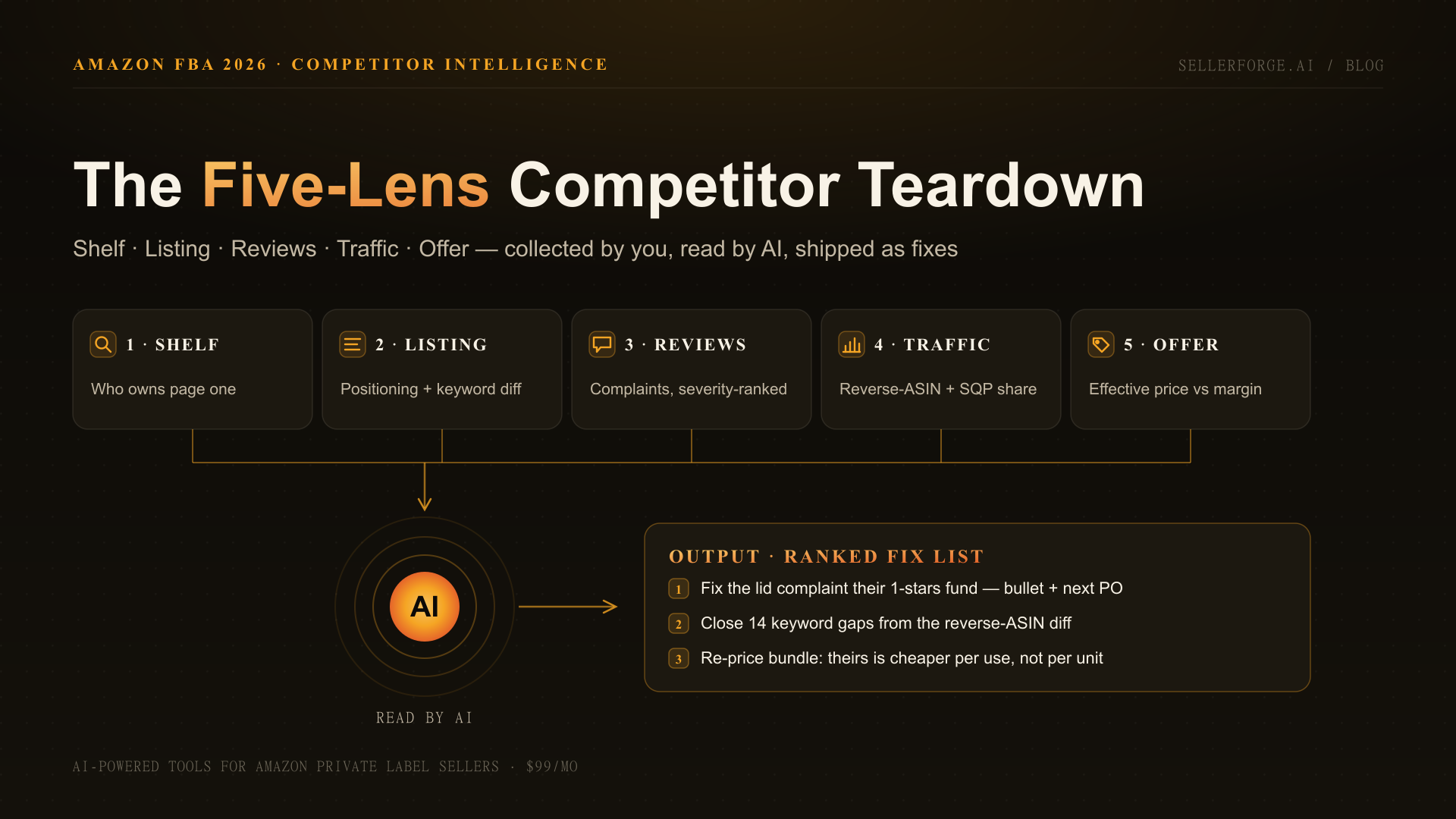
That day is gone. A competitor teardown in 2026 is five lenses — shelf, listing, reviews, traffic, offer — where you collect the raw material and an AI does the reading. Generic assistants like ChatGPT and Claude handle the analysis if you feed them; purpose-built platforms like SellerForge (our product, disclosed up front) run it against your live account. Either way, what took a day now takes under an hour.
Across the 57 accounts I managed at Worldfront, competitor decks were the deliverable clients loved most and used least — by the time a human finished one, the shelf had already moved. The workflow below is what I actually run now. It is built to end in changes shipped, not slides admired.
How Do You Find Your Real Competitors on Amazon?
Search your primary keyword and study page one: the top organic results plus the sponsored placements above them are your direct competitors. Confirm with the "Frequently bought together" and "Customers also viewed" carousels on the top three product pages — those show which ASINs Amazon itself treats as substitutes for yours.
Most sellers stop there and pick the wrong rivals — usually the biggest brand on the page, which is rarely the ASIN actually taking their clicks. The shelf is crowded and getting more corporate: Amazon hosts roughly 1.6 million active third-party sellers, and brand-registered, PPC-running operators dominate page one in most categories.
Brand-registered sellers have a ground-truth shortcut most ignore: the Search Query Performance dashboard in Brand Analytics. For every query you appear on, it reports your share of impressions, clicks, and purchases — and the ASIN view expands each search term to show the top 10 clicked products for that query. That list, per MerchantSpring's SQP guide, is Amazon's own answer to "who is beating me on this keyword" — no third-party estimate involved.
- Pick 2–4 competitors, not 10: the ASIN directly above you in organic rank, the closest-priced rival, and the category leader as a ceiling reference
- Include one climber — an ASIN that entered page one within the last 90 days tells you what Amazon's algorithm is currently rewarding
- Skip ASINs you cannot learn from: a private-label clone at half your price with 40 reviews is a pricing fact, not a strategy source
The Five-Lens Teardown: The Full Workflow
The Five-Lens Teardown is a fixed sequence: for each of five lenses you collect a small, specific bundle of raw data, hand it to an AI with one job, and keep one output artifact. Run in order, the five artifacts merge into a single ranked fix list. Budget 45–60 minutes per competitor the first time; half that once the prompts are saved.
| Lens | You collect (manual) | The AI's job | Output artifact |
|---|---|---|---|
| 1. Shelf | Screenshots of page one for your top 3 queries; SQP top-10 clicked ASINs | Map who owns organic vs. sponsored real estate and where you are absent | Share-of-shelf snapshot |
| 2. Listing | Competitor title, bullets, A+ text, image descriptions — plus your own | Extract positioning, claims, keywords, gaps; diff against your listing | Listing gap table |
| 3. Reviews | 30–50 recent competitor reviews, skewed to 1–3 stars | Severity-rank complaints; extract praised features and buying anxieties | Complaint/praise map |
| 4. Traffic | Reverse-ASIN keyword export; SQP share data; sponsored placements you observed | Find keywords they rank for that you don't; infer their PPC priorities | Keyword/PPC gap list |
| 5. Offer | Price history, coupons, bundle contents, unit count, warranty | Compute effective price per use; flag where their offer beats yours structurally | Offer comparison + margin check |
As a numbered process, one full teardown looks like this:
- 1Pick 2–4 real competitors from page one of your primary query, the substitute carousels, and (if brand-registered) the SQP top-10 clicked ASINs.
- 2Capture the shelf: screenshot page one for your top three queries and note every organic and sponsored slot each competitor holds.
- 3Copy each competitor's full listing text and your own into your AI assistant and ask for a positioning and keyword diff.
- 4Pull 30–50 recent reviews per competitor (weighted toward 1–3 stars) and have the AI severity-rank complaints and extract praised features.
- 5Export a reverse-ASIN keyword report per competitor and cross-reference it against your own keyword set and SQP shares.
- 6Compare offers: effective price after coupon, unit economics, bundle contents — and check against your own contribution margin before copying anything.
- 7Merge the five artifacts and ask the AI for the ten highest-leverage changes, ranked by expected impact and effort; ship the top three this week.
The Five-Lens rule of thumb: collection is manual and cheap, analysis is AI and fast, action is human and scarce. If a teardown does not end with changes shipped to your listing, ads, or price, it was entertainment.
Lens 2 — What Should You Analyze in a Competitor's Listing?
Analyze a competitor's listing for positioning, not vocabulary: which buyer and use-case the title targets, which objections the bullets pre-empt, what the image stack proves visually, and which claims the A+ content stakes out. Keyword extraction matters, but the strategic read — who they are for — is what changes your own copy.
The 2026 wrinkle makes this lens more interesting: Amazon now caps titles at 75 characters (with a separate 125-character Item Highlights field) as of July 27, 2026 — so the keyword-stuffed 200-character titles you may be benchmarking against are dead formats. Watch which competitors have adapted; a rival still showing a truncated legacy title is behind their own teardown cycle. Run your findings against our Amazon listing audit checklist to score both sides of the comparison.
The AI prompt that earns its keep here: paste your listing and the competitor's, then ask for a table of positioning differences, claims they make that you don't, keywords present in theirs and absent in yours, and the one image in their stack doing the most persuasion work. A purpose-built audit — like the one behind SellerForge's Listing Audit module — runs the same comparison scored across every quality dimension automatically.
Lens 3 — How Do You Mine Competitor Reviews With AI?
Sample 30 to 50 of a competitor's recent reviews, weighted toward one-to-three stars, and have an AI severity-rank the complaints, cluster the praised features, and list the anxieties buyers mention before purchase. That single pass tells you what the market wants fixed — research the competitor already paid for.
A competitor's one-star column is a product roadmap someone else funded. When a rival's reviews repeatedly flag a flimsy hinge, a confusing manual, or sizing that runs small, you have found three things at once: a product improvement for your next PO, a bullet point for your listing, and an ad angle for the exact shoppers reading those reviews.
- Ask for severity ranking, not sentiment percentages — "12% negative" is trivia; "the #1 complaint is the lid cracking in week two" is a decision
- Extract the vocabulary buyers use for problems and paste it into your bullets and backend terms — shoppers search with complaint language
- Run the same pass on your own reviews and diff the two complaint maps: anything they fixed that you haven't is priority one
- Recent reviews only (90–180 days) — old complaints may describe a product revision that no longer ships
This is also the lens where AI adoption has simply become table stakes: more than 900,000 Amazon sellers were already using AI tools in 2025, and review synthesis is among the first jobs they automate. If you are still reading competitor reviews by hand, you are competing against sellers who aren't.
Lens 4 — How Do You Reverse-Engineer Competitor Keywords and PPC?
Run a reverse-ASIN lookup on each competitor to see every keyword they rank for, then cross it against your own set: keywords they own that you miss are your expansion list, and keywords you both target where they out-rank you are your defense list. Layer SQP share data on top for ground truth.
This lens is where paid research tools genuinely earn their subscription — reverse-ASIN depth is something Seller Central will not give you, and it is the strongest honest reason to keep a research tool in your stack. The free complement is SQP: track your impression, click, and purchase share per query weekly, and a competitor gaining ground shows up as your share eroding before it ever shows in sales. Keyword strategy itself has changed under Amazon's semantic ranking — the full picture is in our COSMO-era keyword strategy guide.
For PPC inference, watch where they spend: search your core queries in an incognito window at two different times of day and note which competitors hold sponsored slots consistently — consistent presence on an expensive head term usually means it converts for them. Then decide where to fight. Product-targeting ads on a competitor's detail page work when the teardown gives you a visible edge in the comparison moment; our team covers the mechanics in the SellerForge advertising module — see /ads for how we structure it.
Lens 5 — How Do You Compare Price, Offer, and Margin Position?
Compare effective prices, not sticker prices: list price minus coupon, divided by unit count or uses, including what the bundle actually contains. A competitor $4 cheaper who ships two fewer accessories is more expensive per use — and that arithmetic is a listing bullet waiting to be written.
The margin check is the half of this lens sellers skip. Matching a rival's price is only a strategy if the unit economics survive it — which is why every teardown should end against your own numbers, not theirs. Third-party sellers now move 60% of units sold on Amazon (Marketplace Pulse, Q1 2026 — down from the 62% peak, the first sustained decline since 2004), and the squeeze shows up precisely in sellers price-matching their way out of contribution margin. Before you copy anyone's price, read your own contribution margin per ASIN.
Which Tools Do You Actually Need for Competitor Analysis?
You need three capabilities, not ten tools: ground-truth data on queries you compete on (free, in Seller Central), keyword depth on rivals (a paid research tool), and synthesis that converts raw material into decisions (AI). Here is the honest split, including where our own product does and does not fit.
| Option | Best at | Honest weakness | Cost |
|---|---|---|---|
| Seller Central free reports (SQP, Product Opportunity Explorer) | Ground-truth impression/click/purchase share; top-10 clicked ASINs per query | Brand Registry required; only covers queries you already appear on | $0 |
| Helium 10 / Jungle Scout | Reverse-ASIN keyword depth, sales estimates, historical tracking | Estimates carry 20–30% error per ASIN; you still do the reading | $49–$359/mo |
| ChatGPT / Claude (generic AI) | Synthesis of anything you paste: reviews, listings, exports | No Amazon access; no memory of your business between sessions | $0–$20/mo |
| SellerForge (ours) | AI teardown with persistent account context — findings become staged fixes to your listing, ads, and pricing | Not a research-data firehose; pair with a reverse-ASIN tool for keyword depth | $99/mo flat |
Routing honestly: if your bottleneck is discovering keywords, buy the research tool first. If your bottleneck is pure PPC bid automation at scale, that category belongs to dedicated ad platforms like Pacvue or Perpetua, not us. If your bottleneck is that analysis never turns into shipped changes — the most common failure I see — that is the job SellerForge was built for.
Where SellerForge Fits (Honestly)
SellerForge is our product, so read this section knowing that. Its role in this workflow is the analysis-to-action half: the AI assistant already knows your ASINs, margins, keywords, and review history through your connected account, so a teardown is a conversation, not a data-entry session — and the output lands as staged, approval-first fixes rather than a document.
The persistent-context point matters more here than in any other workflow. Lens 3 and Lens 4 findings are only useful diffed against your own reviews and your own keyword shares — which a generic chatbot re-learns from scratch every session and a purpose-built platform already holds. That is the structural difference, and it is the same argument we make in the wider guide to how sellers are using AI in 2026.
Where we route you elsewhere: keyword-depth research (Helium 10 or Jungle Scout are genuinely better at it), pure bid automation (Pacvue/Perpetua), and sales estimates (any research tool — we refuse to fabricate numbers Amazon does not publish). What the 14 modules do own is the loop from insight to shipped change: listing fixes via Listing Audit, per-ASIN economics via Custom Breakdowns, and week-over-week movement via the Weekly Business Report.
The Bottom Line
Competitor analysis on Amazon stopped being a research problem and became a routing problem: the data is a few clicks away, the AI reads it in minutes, and the only scarce resource left is the discipline to ship what the teardown finds. Run the Five-Lens Teardown quarterly per hero ASIN, re-run a single lens when a trigger fires — rank drop, new page-one entrant, a 10% competitor price move — and always end with three changes shipped.
The sellers losing ground in 2026 are not the ones with worse products. They are the ones still treating a rival's listing, reviews, and keyword set as things to glance at rather than data to process. An hour a quarter is what it costs to be on the right side of that line.
If you want the teardown loop with your own account's context already loaded — margins, keywords, reviews, and the fixes staged for approval — start a SellerForge trial and run your first Five-Lens Teardown against a real competitor this week.
About the author
David Gallo is the founder of SellerForge.ai. Before building SellerForge, he managed 57 Amazon seller accounts representing over $350M in sales at Worldfront, where competitor teardowns were a weekly deliverable — first by hand, then, much faster, not.