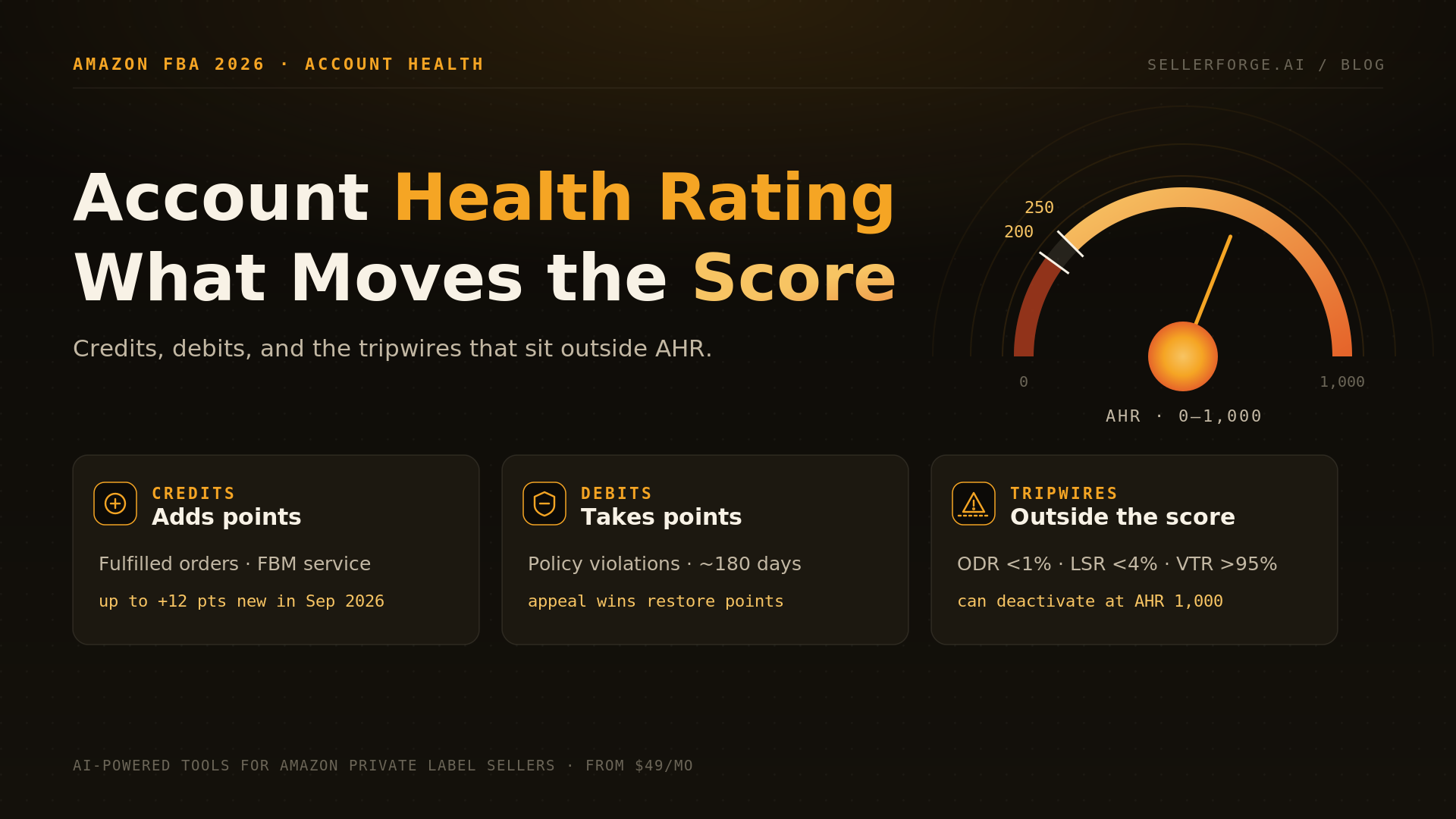
Amazon's Account Health Rating (AHR) is a 0–1,000 score that tracks your compliance with Amazon's selling policies: 200+ is healthy, 100–199 is at risk, and below 100 you are eligible for deactivation. It rises with fulfilled orders (and, since September 2026, strong FBM customer service) and falls with policy violations, which count for about 180 days. Order defect rate and shipping metrics sit outside the score and can deactivate you on their own. SellerForge watches both together.
Amazon's Account Health Rating is the most-watched number in Seller Central and one of the least understood. It is a 0–1,000 score that measures one thing: how well your account is complying with Amazon's selling policies. At 200 or above you are healthy, from 100 to 199 you are at risk, and below 100 Amazon can deactivate you without further notice.
This guide separates the pieces: what adds points, what takes them away, what never touches the score but can still shut you down, and the order in which to fix a falling rating.
What Is the Amazon Account Health Rating?
The Amazon Account Health Rating (AHR) is a score from 0 to 1,000 that reflects your adherence to Amazon's selling policies over roughly the last 180 days. It appears at the top of the Account Health page in Seller Central, color-coded by status, and it exists to show one thing: how close your account is to deactivation for policy reasons.
One sentence to keep taped to the monitor: AHR measures policy compliance, not account performance. A healthy AHR does not mean a healthy account, and Amazon can still deactivate immediately, regardless of the score, when it suspects fraud or harmful activity.
How Is the Account Health Rating Calculated? The Credit–Debit–Tripwire Map
The Account Health Rating is calculated as a running balance: points earned from fulfilled orders and, for FBM sellers since September 2026, customer service, minus points deducted for policy violations inside a 180-day window. Performance metrics such as ODR sit beside the score as separate pass/fail tests. The Credit–Debit–Tripwire Map sorts every input into one of those three buckets.
I use this map because every AHR question sellers ask me reduces to which bucket something belongs in. Amazon does not publish the formula, so treat the point values below as the best available estimates, clearly labelled, rather than as policy.
Credits: what adds points
- Fulfilled order volume. Every seller is reported to start at 200, and third-party analyses (Feedvisor, Seller Essentials) put the volume credit at roughly 4 points per 200 successfully fulfilled orders over a trailing 180 days. Amazon has not published that rate, but it has confirmed the mechanism: a lower 180-day order count can lower your AHR.
- FBM customer service (new in 2026). Per Amazon's September 4, 2026 Seller Central announcement, merchant-fulfilled sellers can earn up to 12 extra points for a buyer contact rate below 0.50%, average contact response under 12 hours, and a buyer dissatisfaction rate below 4.5%. These points only move the score up, and FBA sellers see these metrics as not applicable.
Debits: what takes points away
- Policy violations, deducted once when they post, with severity tiers Amazon describes as critical, high, medium, and low.
- Restoration is possible: when a violation is successfully appealed and removed, Amazon reinstates the deducted points instead of making you wait out the window.
- Time heals the rest: violations generally stop counting after about 180 days.
- Size is unpublished, and the estimates disagree badly. Feedvisor cites 2 to 8 points per violation with repeats of the same policy doubling; Enso Brands cites 50 to 200 points for a major incident such as a counterfeit claim. Both can be true for different severities, which is exactly why a single "points per violation" number online should not be trusted.
- The extreme case is not a deduction at all: a counterfeit confirmed through a test buy can take the rating to 0 with only a 3-day grace period.
Tripwires: what never touches the score
What Is a Good Account Health Rating on Amazon?
A good Account Health Rating on Amazon is anything at 200 or above, which Amazon labels Healthy. The operating target should be 250 or higher, because that is the level you must hold for six months to qualify for Account Health Assurance. From 100 to 199 is At Risk, and below 100 the account is eligible for deactivation.
| AHR band | Status | What it means in practice | What to do this week |
|---|---|---|---|
| 250–1,000 | Healthy + AHA-eligible range | Room to absorb a complaint; qualifies for Account Health Assurance after six months | Keep the weekly review; build the evidence vault before you need it |
| 200–249 | Healthy | No enforcement pending, but one medium violation can push you under 200 | Clear any open violations you can document; stop the next one at the source |
| 100–199 | At Risk | At-risk warning on the Account Health page; the margin for error is gone | Appeal removable violations first; fix root causes before anything else |
| 0–99 | Unhealthy | Eligible for deactivation without further notice | Treat it as a suspension in waiting: plan of action ready today |
Why Did My Account Health Rating Drop?
An Account Health Rating drops for one of two reasons: a policy violation posted, or your volume credit shrank because fewer orders were fulfilled in the last 180 days. The second one is what seller forums call a drop "for no reason," and Amazon has confirmed it happens. It cannot take you below 200 on its own, so the first diagnostic question is always where the score is now.
| What you see | Bucket | Likely cause | First move |
|---|---|---|---|
| Small, steady decline, no new notice | Credit | Order volume rolling out of the 180-day window (post-Q4, stockout, paused SKUs) | Check 180-day fulfilled orders; no appeal needed |
| Sudden drop with a new notice | Debit | New policy violation (IP, condition, listing policy, restricted product) | Open the violation, decide appeal vs. fix, act within days |
| Drop after you deleted a listing | Debit | The violation stays even though the ASIN is gone | Resolve the violation itself; deleting never restores points |
| Score to 0 overnight | Debit (extreme) | Confirmed counterfeit or similar critical finding | Critical-path appeal within the grace period; invoices and authorization letters now |
| AHR fine, deactivation warning anyway | Tripwire | ODR, cancellation, late shipment, or tracking rate breach | Fix the metric; AHR will not protect you |
Does Order Defect Rate Affect Account Health Rating?
No. Order defect rate does not feed the Account Health Rating; it is a separate customer-service performance target with its own 1% threshold over a rolling 60 days. The same is true of cancellation, late shipment, and tracking rates. Each can trigger deactivation independently, so an account with a perfect 1,000 AHR can still be suspended for an ODR breach.
| Tripwire metric | Target | Window | Who it applies to |
|---|---|---|---|
| Order Defect Rate (negative feedback, A-to-z claims, chargebacks) | Under 1% | Rolling 60 days | All sellers |
| Pre-fulfillment Cancellation Rate | Under 2.5% | Rolling 7 days | Seller-fulfilled |
| Late Shipment Rate | Under 4% | 10 and 30 days | Seller-fulfilled |
| Valid Tracking Rate | Over 95% | Rolling 30 days | Seller-fulfilled |
| On-Time Delivery Rate | 90% or higher | Rolling 30 days | Seller-fulfilled |
How Do You Raise Your Account Health Rating Back Above 200?
You raise an Account Health Rating fastest by getting violations removed, because a successful appeal restores the deducted points immediately. Everything else works slowly: waiting out the 180-day window, or growing fulfilled orders. The order below prioritizes by speed and by risk, and it assumes the account is still active.
- 1Screenshot the Account Health page and export every open violation with its date, ASIN, and policy. The 180-day clock starts on each violation's date, so note when each one falls off.
- 2Sort each violation into three piles: wrong (you can prove it), fixed (it was real and the root cause is gone), or open (it was real and the cause still exists).
- 3Appeal the wrong pile first with documents, not arguments: invoices, authorization letters, test reports, listing history. These are the cheapest points you will ever recover.
- 4For the fixed pile, submit a plan of action that names the root cause, the corrective action already taken, and the preventive system. Rebuild the plan per violation; never recycle a rejected one.
- 5Fix the open pile before appealing it. Close or correct the listing, quarantine the inventory, or change the supplier, then appeal. An appeal for a cause that still exists burns credibility for the next one.
- 6Check the tripwires the same day. An account climbing back to 200 while ODR drifts toward 1% has traded one deactivation path for another.
- 7Rebuild the credit side. Restore in-stock on core SKUs, and if you are FBM, tighten response times and contact rate to earn the new customer-service points.
- 8Set the 250 line as the recovery target, not 200, and hold it for six months to earn Account Health Assurance.
Why 250 Is the Number That Actually Matters
The 250 line matters because it is the entry ticket to Account Health Assurance, Amazon's commitment not to deactivate a consistently healthy seller while they work an issue, with 72 hours to respond. To qualify you need a Professional account, AHR of 250 or higher for six months with no more than 10 days below 250, and a valid emergency contact.
The operator rule I set on every account: 200 is Amazon's line, 250 is ours. Any week the rating sits between 200 and 249, the account gets the same attention as an account under 200, because the next complaint decides whether you have AHA when you need it.
Where SellerForge Fits (and Where It Does Not)
SellerForge is our product, so read this section with that in mind. It fits sellers who want AHR, the tripwire metrics, and the rest of the account read together by one AI, from $49 a month. It does not replace Amazon's own dashboard, a lawyer for a litigation-bound IP case, or a specialist for an identity-driven Section 3.
| Option | Cost | Watches AHR | Watches tripwires | Connects to profit, inventory, ads | Helps you respond |
|---|---|---|---|---|---|
| Account Health page + notifications | Free | Yes | Yes | No | Appeal forms only |
| Seller Assistant (Amazon's AI in Seller Central) | Free | Yes, on request | Yes, on request | Partly, inside Amazon's view | Explains policies; no evidence vault |
| Single-purpose alert monitors | Low monthly fee | Yes | Usually | No | Alerts only |
| Account health services and consultants | Per case or retainer | Yes, by a person | Yes, by a person | Rarely | Yes, strongest for complex cases |
| SellerForge (ours) | From $49/mo | Yes | Yes | Yes, whole account | POA drafts, escalation plans, document vault |
The Bottom Line
The Account Health Rating is a policy score with a volume credit attached, not a full health check. Know which bucket every change belongs in: credits move slowly, debits move fast and can be reversed by appeal, and tripwires ignore the score entirely. Hold 250, review the tripwires in the same sitting, and keep the evidence filed before the complaint arrives.
About the author
David Gallo is the founder of SellerForge.AI. Before building it, he managed 57 Amazon seller accounts representing more than $350M in sales at Worldfront, where Monday account-health review was non-negotiable and the lesson that stuck was simple: the big green number is not the whole story. He writes the SellerForge blog for operators, not affiliates.